Ephemeral Preview Environments on Kubernetes

An ephemeral preview environment is an isolated, temporary Kubernetes deployment created from a single feature branch and torn down when the work is done. Every branch gets its own namespace, its own image, its own URL - and zero of it lingers afterward. Ephemeral environments on Kubernetes make this pattern available on your own cluster - but a hands-on, open-source, portal-native version - feature branch to isolated namespace to one-click destroy, backed by real Tekton CI and Argo CD GitOps - is conspicuously missing from the public record.
So I built one, end to end, on the same local try-kuberocketci testbed from my last post: a kind cluster running KubeRocketCI 3.14.0 with Tekton, Argo CD, and self-hosted GitLab. This post is the full walkthrough - every screenshot, every line of terminal output, captured from a live run. We will take a stable main deployment, branch off it, ship a change that is visible only in the preview environment, inject per-environment config through GitOps, prove the two environments never touch each other, and then destroy the whole thing - leaving the baseline exactly as it was.
What Is an Ephemeral Preview Environment?
An ephemeral preview environment is a short-lived, namespace-isolated copy of your application, provisioned automatically from a feature branch or pull request and destroyed when that branch merges or is no longer needed. Unlike a shared staging environment - where one branch at a time monopolizes the slot - a preview environment is dedicated to a single branch, carries no long-term state, and releases its resources (namespace, pods, ingress) the moment you tear it down.
The terms preview environment and ephemeral environment are used interchangeably. "Preview" emphasizes the use case (review a branch before merge); "ephemeral" emphasizes the lifecycle (temporary by design). In KubeRocketCI they are the same object: a Deployment Stage with its own isolated Kubernetes namespace, created for a branch and removed on demand.
A preview environment lifecycle has five stages:
- Trigger - create or push a branch in the Portal.
- Build - Tekton pipeline builds and pushes a versioned image.
- Provision - namespace created, Argo CD syncs the application.
- Validate - test the live URL.
- Destroy - namespace and Argo CD application deleted.
Ephemeral vs. Staging: Why Shared Environments Become Bottlenecks
A shared staging environment serializes your team: only one branch can occupy it at a time, so parallel feature work cannot be validated simultaneously, and "who broke staging?" becomes a recurring standup question. Ephemeral preview environments give every branch its own namespace, so several features can be tested concurrently without interfering - and when a branch merges, its namespace is deleted, so there is no idle staging box quietly accruing cost.
That last point matters more than it looks. Industry surveys consistently find a large share of provisioned Kubernetes capacity sits idle, and the trend is getting worse - CAST AI's 2026 State of Kubernetes Optimization Report measured average CPU utilization at just 8% across roughly 23,000 production clusters (down from 10% a year earlier), and Flexera's 2026 State of the Cloud report pegs self-estimated cloud waste at ~29%, its first rise in five years. Permanent staging environments are a textbook source of that waste. An environment that deletes itself cannot become idle.
Namespace-per-Branch, vCluster, or Dedicated Cluster?
There are three common isolation models. Namespace-per-branch reuses one shared control plane, provisions in seconds, and is sufficient for most teams - it is the model used here. vCluster adds a lightweight virtual API server per environment for stronger isolation at higher overhead. A dedicated cluster per branch is maximum isolation but impractical at scale. KubeRocketCI uses namespace-per-branch, with Argo CD managing each namespace's application manifests.
A separate namespace scopes names, RBAC, and quotas - but by default pods in different namespaces can still reach each other over the cluster network. If your preview environments need network isolation too, add NetworkPolicy rules; the namespace boundary alone does not provide them.
How KubeRocketCI Delivers Preview Environments
Before the walkthrough, a quick map of the moving parts. KubeRocketCI wraps a few core concepts that turn a Git branch into a running environment:
- Codebase / CodebaseBranch - your application (
test-go-app) and a branch within it (feature-tt-123). Creating a branch in the Portal creates theCodebaseBranchresource and mirrors the branch into Git. - CodebaseImageStream (CBIS) - the record of container image tags built for a branch. The build pipeline writes new tags here; the CD side reads from it. This handoff is the key to ordering (more on that below).
- Deployment (CDPipeline) and Environment (Stage) - the deployment flow and the individual environments within it. A Stage owns a namespace and an Argo CD Application.
- Trigger type -
Manual,Auto, orAuto-stable. We use Auto: the environment redeploys whenever a new image tag lands in the CBIS, so the preview env always tracks the branch head with no manual step. (See Deployment Strategies.)
Here is the full path from a feature-branch build to a live, isolated workload:
The crucial detail is the CBIS handoff: Tekton writes the image tag after the image is actually pushed, and the Auto trigger only fires once that tag exists. The image is therefore guaranteed to be present before Argo CD tries to deploy it - which avoids the ImagePullBackOff race that bare deploy-only tooling is prone to.
Baseline: The Local Testbed Starting Point
The starting point is the end state of the previous post: the sample Go/Gin app test-go-app built from main and deployed by the demo Deployment into namespace krci-demo-dev.
$ kubectl get applications -n krci
NAMESPACE   NAME                   SYNC STATUS   HEALTH STATUS
krci        demo-dev-test-go-app   Synced        Healthy

$ kubectl -n krci-demo-dev get deploy test-go-app -o jsonpath='{.spec.template.spec.containers[0].image}'
gitlab.127.0.0.1.nip.io:5050/krci/test-go-app:main-20260606-132413@sha256:a39d120b...
One property of main matters for the rest of this post: the Gin app only handles /hello, so the root path returns 404. That 404 is our control - the feature environment will return 200 on the same path, and main will keep returning 404 the entire time.
# main, GET /         (no root handler on main)
$ curl -s -o /dev/null -w "%{http_code}\n" http://localhost:18080/
404
Step 1: Create the Feature Branch via the Portal
In the test-go-app component, Branches → Create branch. I name it feature-tt-123, leave From as main, and keep the default review and build pipelines.
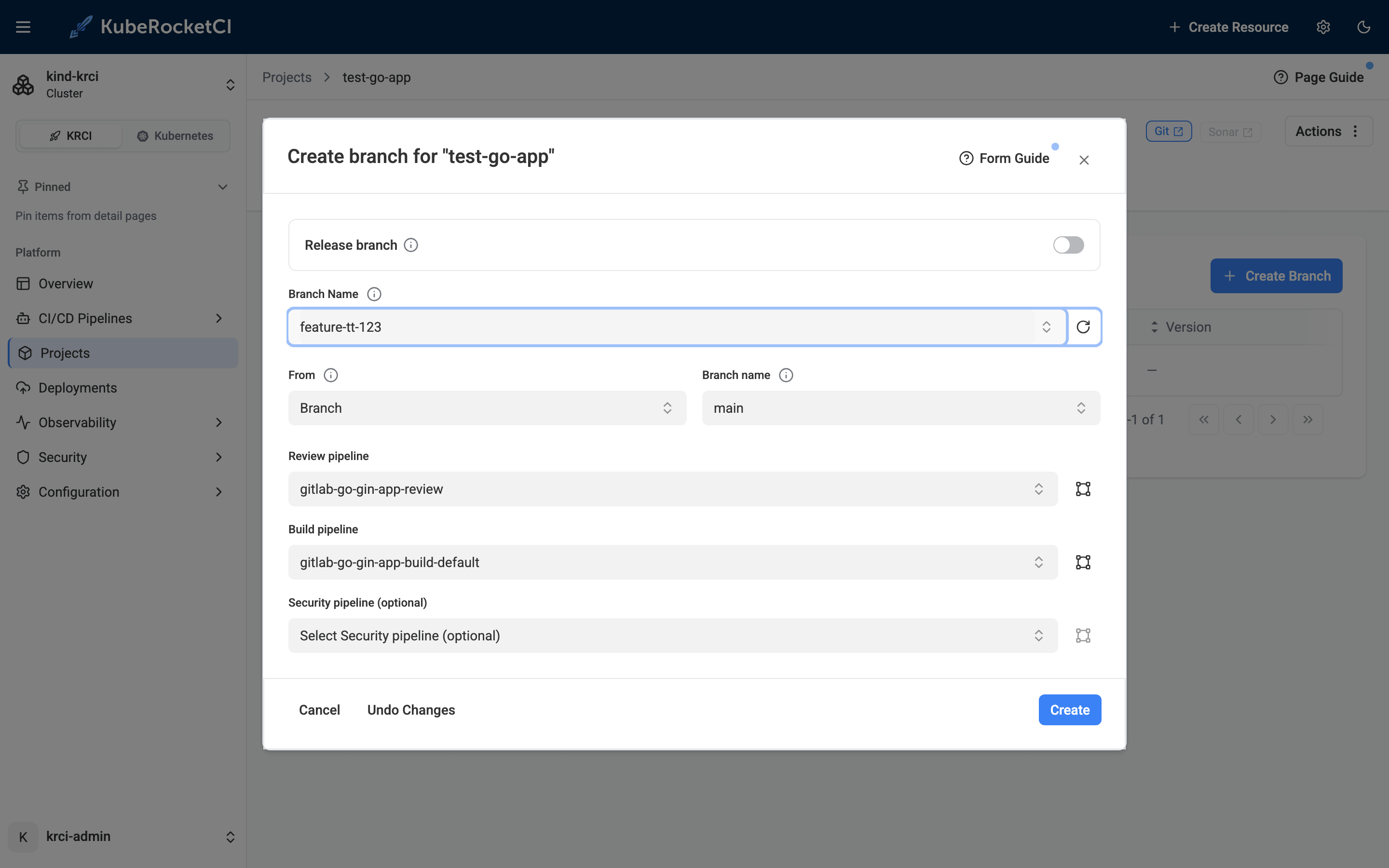
Clicking Create provisions a CodebaseBranch resource and mirrors the branch into GitLab with an (initially empty) CodebaseImageStream:
$ kubectl -n krci get codebasebranch,codebaseimagestream | grep feature
codebasebranch.v2.edp.epam.com/test-go-app-feature-tt-123-0afaf       created   feature-tt-123
codebaseimagestream.v2.edp.epam.com/test-go-app-feature-tt-123-0afaf  test-go-app
Step 2: Make a Change That Only the Preview Will Show
To prove isolation, the feature branch needs to behave differently from main. I add a root / handler that returns 200 and echoes a NAME environment variable (we will set that variable per-environment in Step 7), plus the Helm extraEnv plumbing the override needs. The whole change is 30 lines across four files:
	r := gin.Default()
	r.GET("/", func(c *gin.Context) {
		c.JSON(http.StatusOK, gin.H{
			"status": "ok",
			"name":   os.Getenv("NAME"),
		})
	})
	r.GET("/hello", func(c *gin.Context) {
          ports:
            - name: http
              containerPort: {{ .Values.service.port }}
              protocol: TCP
          {{- if .Values.extraEnv }}
          env:
          {{- toYaml .Values.extraEnv | nindent 12 }}
          {{- end }}
The default extraEnv: {} goes into values.yaml, and a matching unit test goes into main_test.go. Crucially, this change lives only on feature-tt-123 - main is never touched.
Step 3: Build the Feature Branch
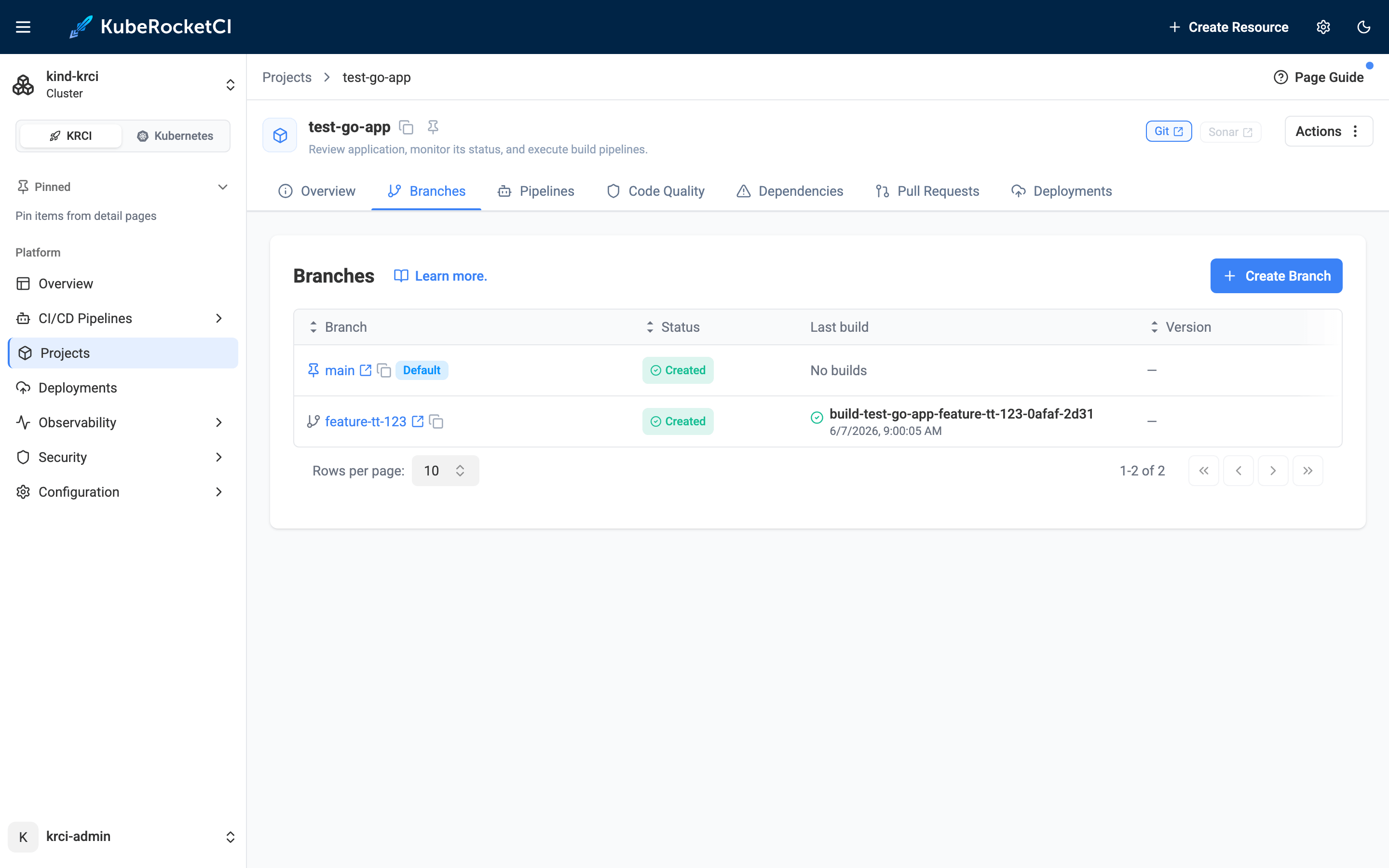
Feature branches are built on demand: on the Branches tab, the feature-tt-123 row has a Build button. One click starts the gitlab-go-gin-app-build-default pipeline.
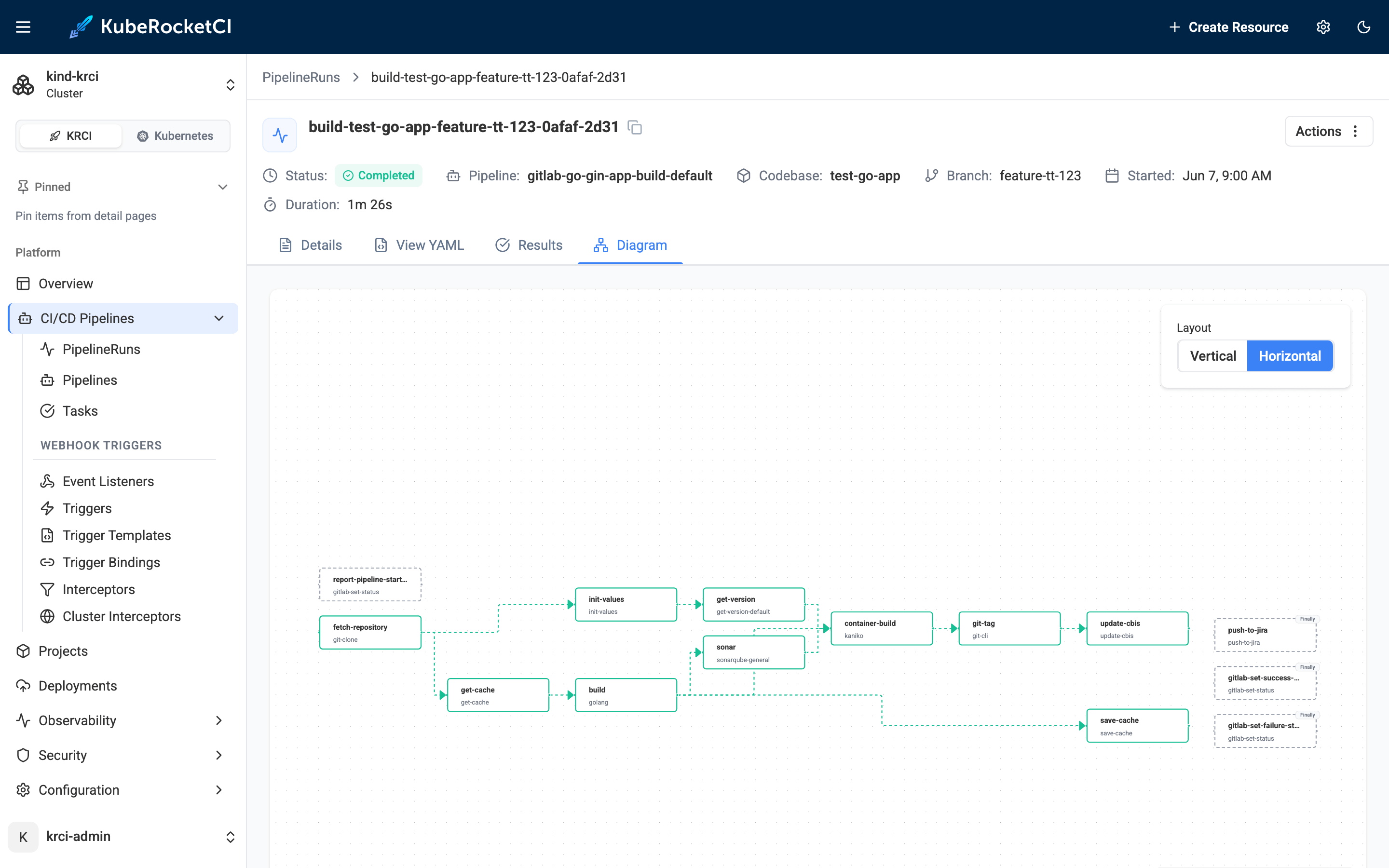
The build is the familiar Tekton DAG - fetch, version, SonarQube quality gate, kaniko image build, Git tag, and the all-important update-cbis step that records the new tag:
$ kubectl -n krci get pipelinerun | grep build-test-go-app-feature-tt-123-0afaf
build-test-go-app-feature-tt-123-0afaf-2d31   True   Completed
Reading the New Image Tag from the CodebaseImageStream
With default versioning, the tag is BRANCH-DATETIME. The build writes it to the CBIS:
$ kubectl -n krci get codebaseimagestream test-go-app-feature-tt-123-0afaf \
    -o jsonpath='{.spec.tags[*].name}'
feature-tt-123-20260607-060023
Step 4: Create the Deployment Flow and Auto-Trigger Environment
Now the environment. I follow the recommended convention of naming the deployment flow after my initials - sk - so personal preview flows are easy to find. In Deployments → Create Deployment, I select test-go-app and set its branch to feature-tt-123.
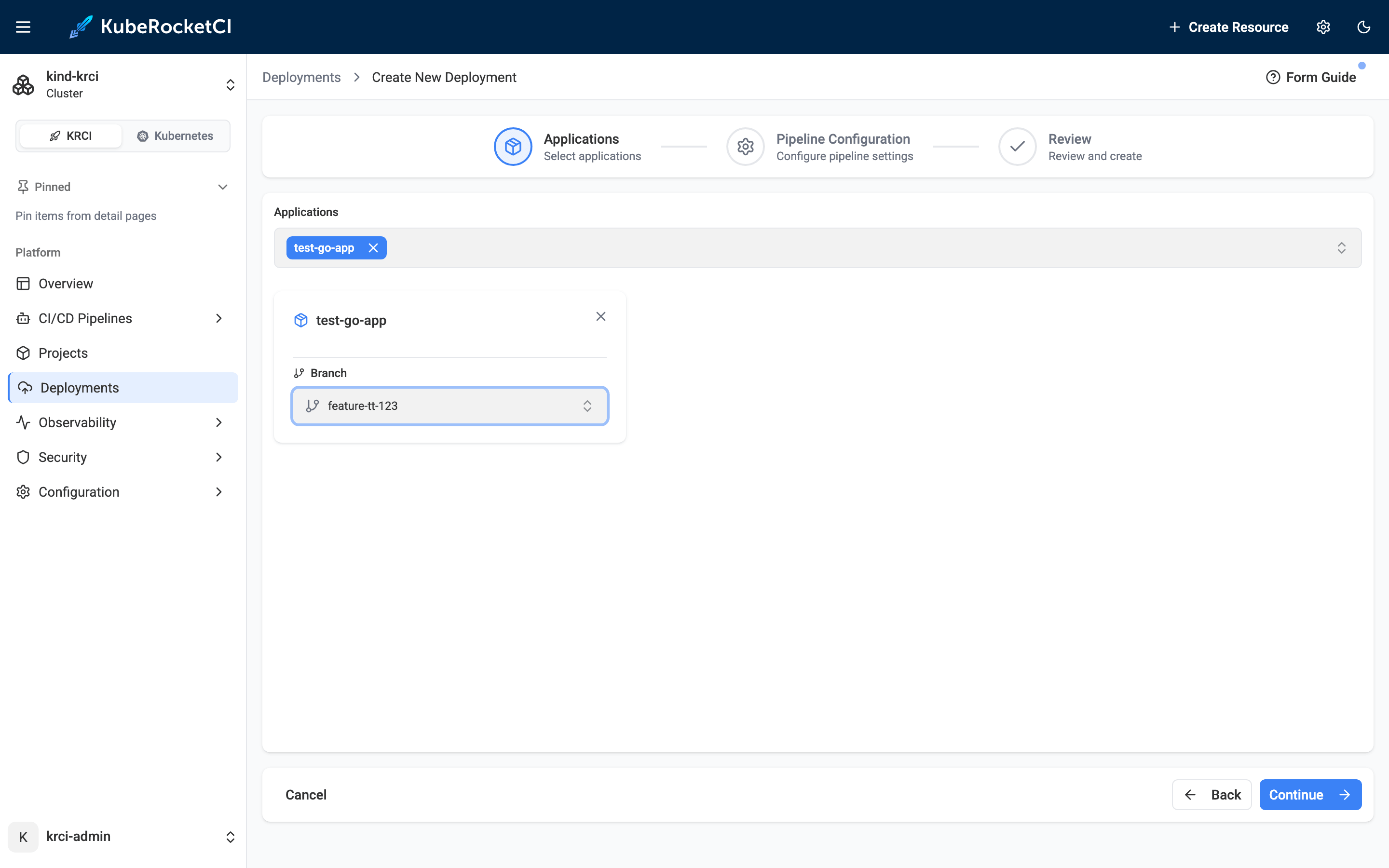
Then I add an environment named feat with trigger type Auto:
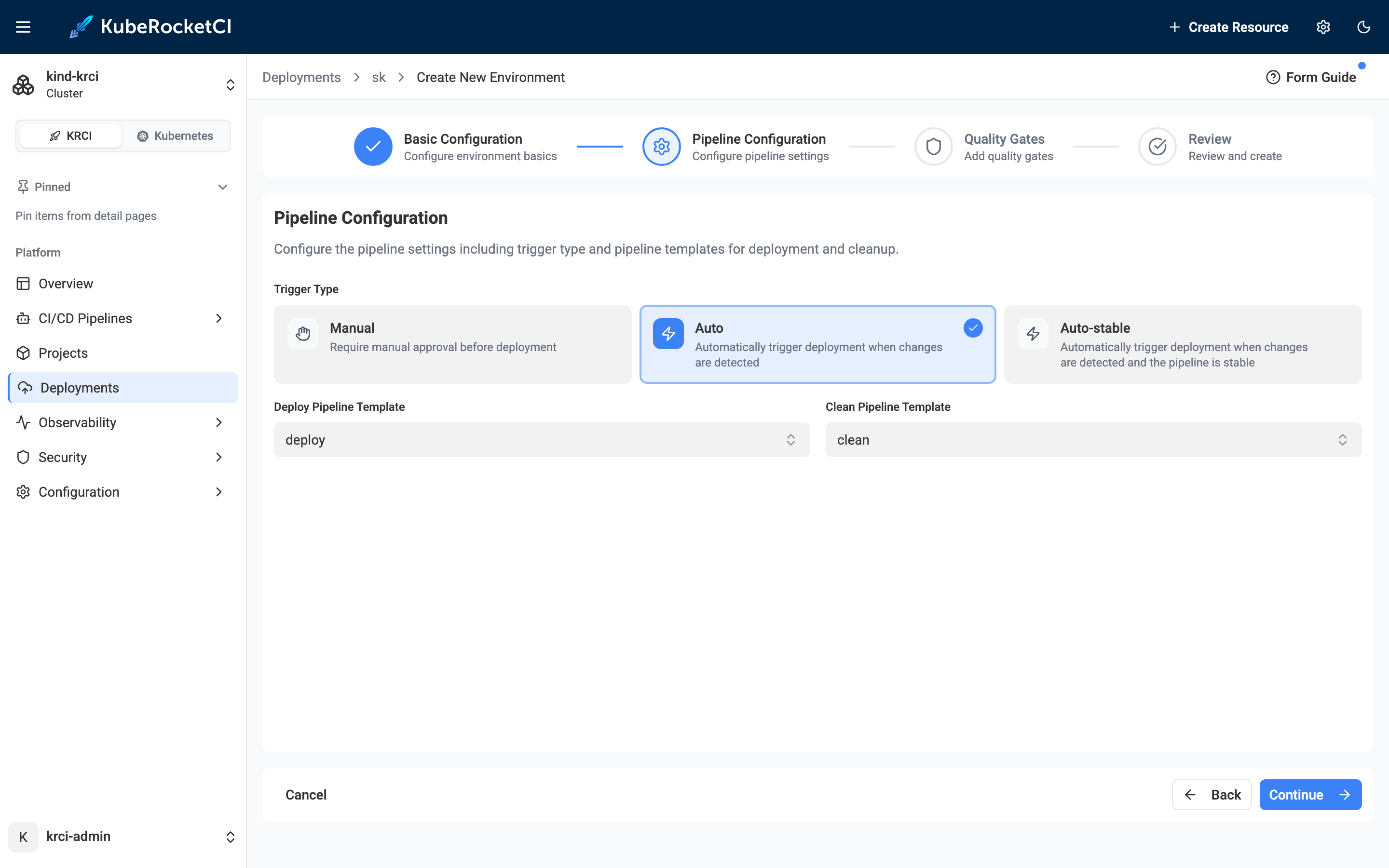
Naming Conventions: How KRCI Builds the Namespace
The namespace is derived as krci-<deployment>-<environment>, which the form pre-fills as krci-sk-feat. The environment overview confirms the wiring - Auto trigger, in-cluster, namespace krci-sk-feat, deploy and clean pipeline templates, quality gate Manual:
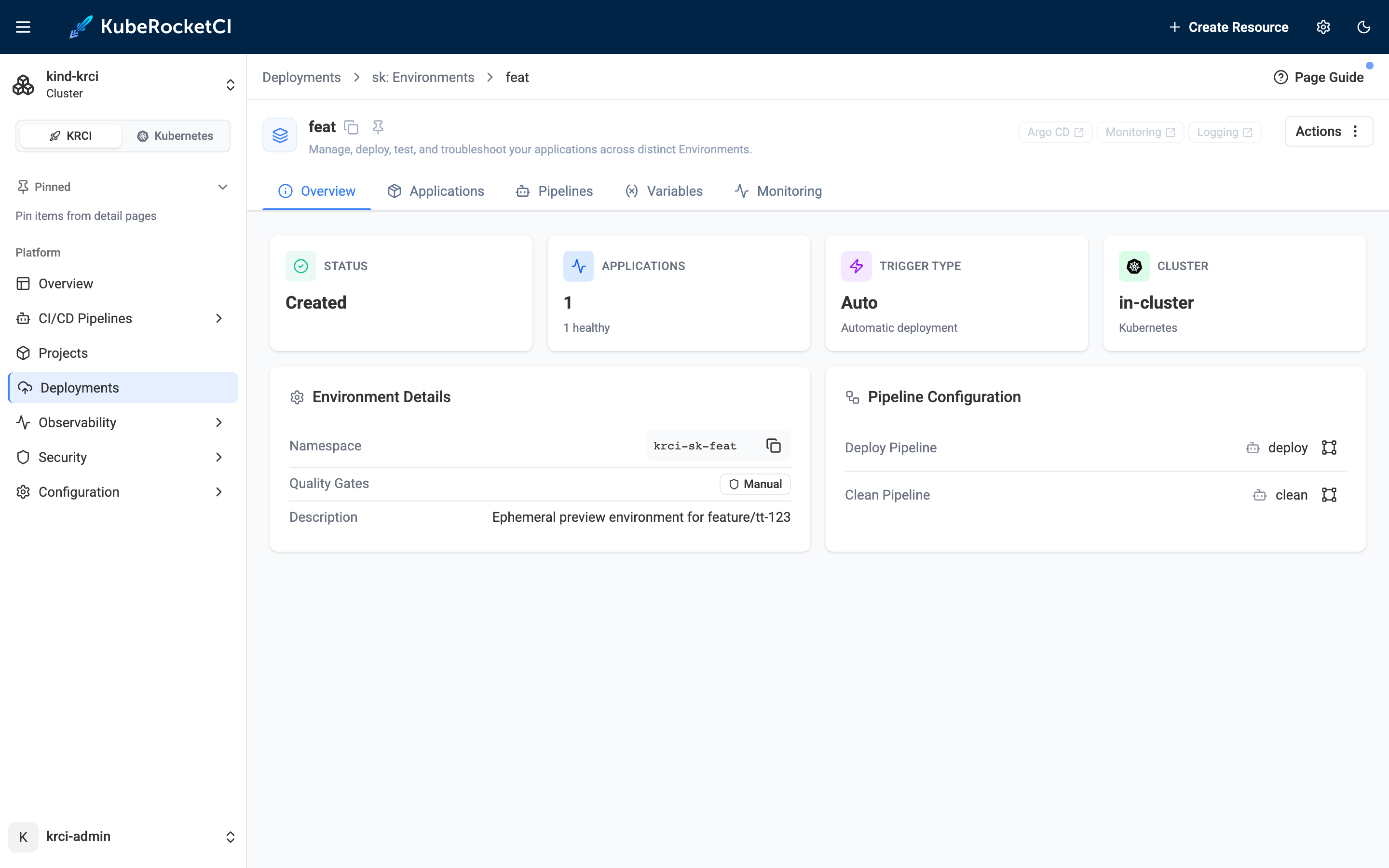
Creating the environment before the next build is deliberate: with Auto, the deploy fires on a CBIS update. Arm the environment first, and the build that follows will deploy itself.
Step 5: The Feature Image Auto-Deploys
Triggering one more build updates the CBIS, the Auto trigger fires, and the cd-pipeline-operator creates the deploy run - no clicks. The deploy pipeline runs its four tasks and goes green in 47 seconds:
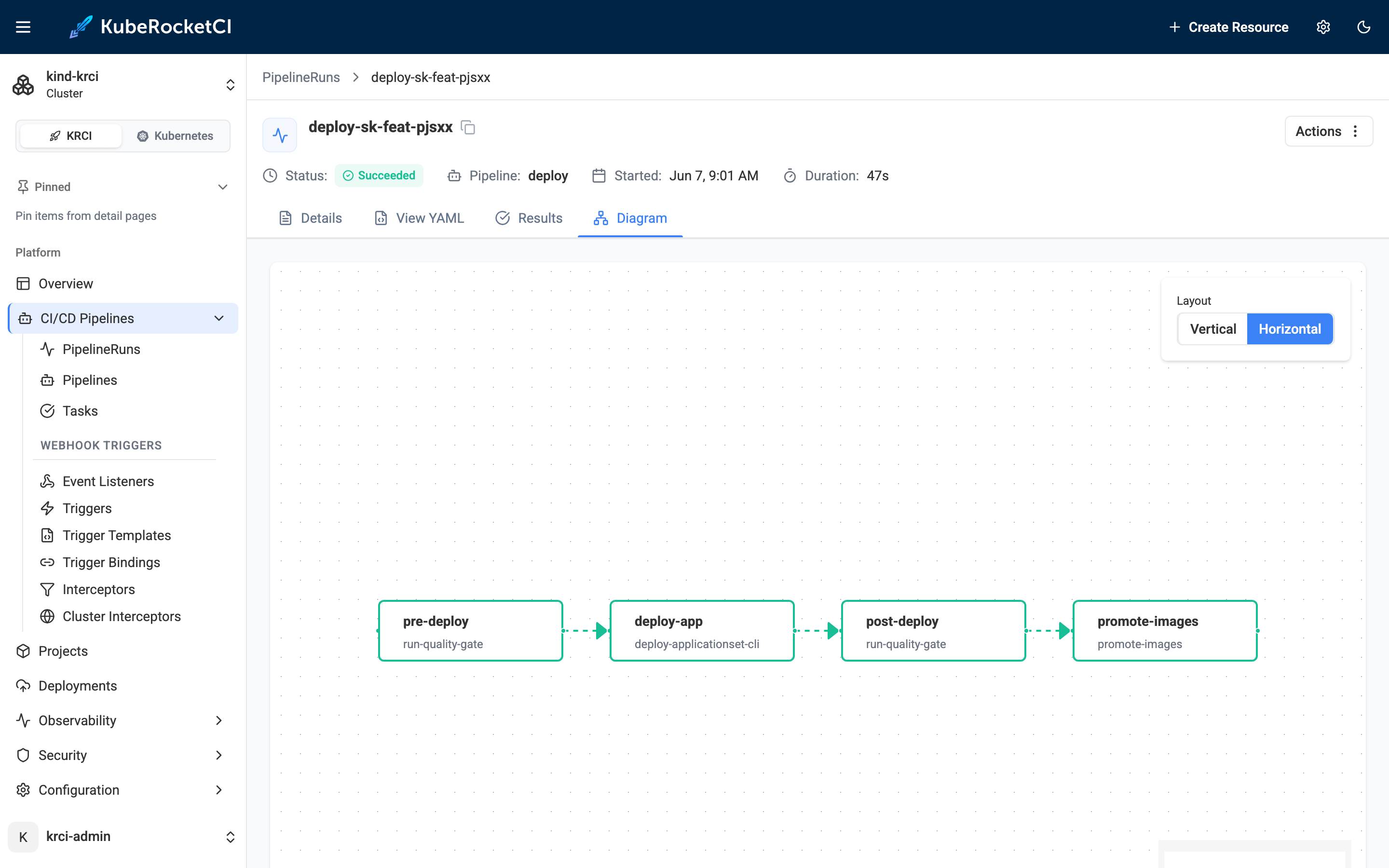
The whole preview environment now shows in one card - the feat Stage, its namespace, the deploy/clean pipelines, and the application Healthy + Synced on the feature tag:
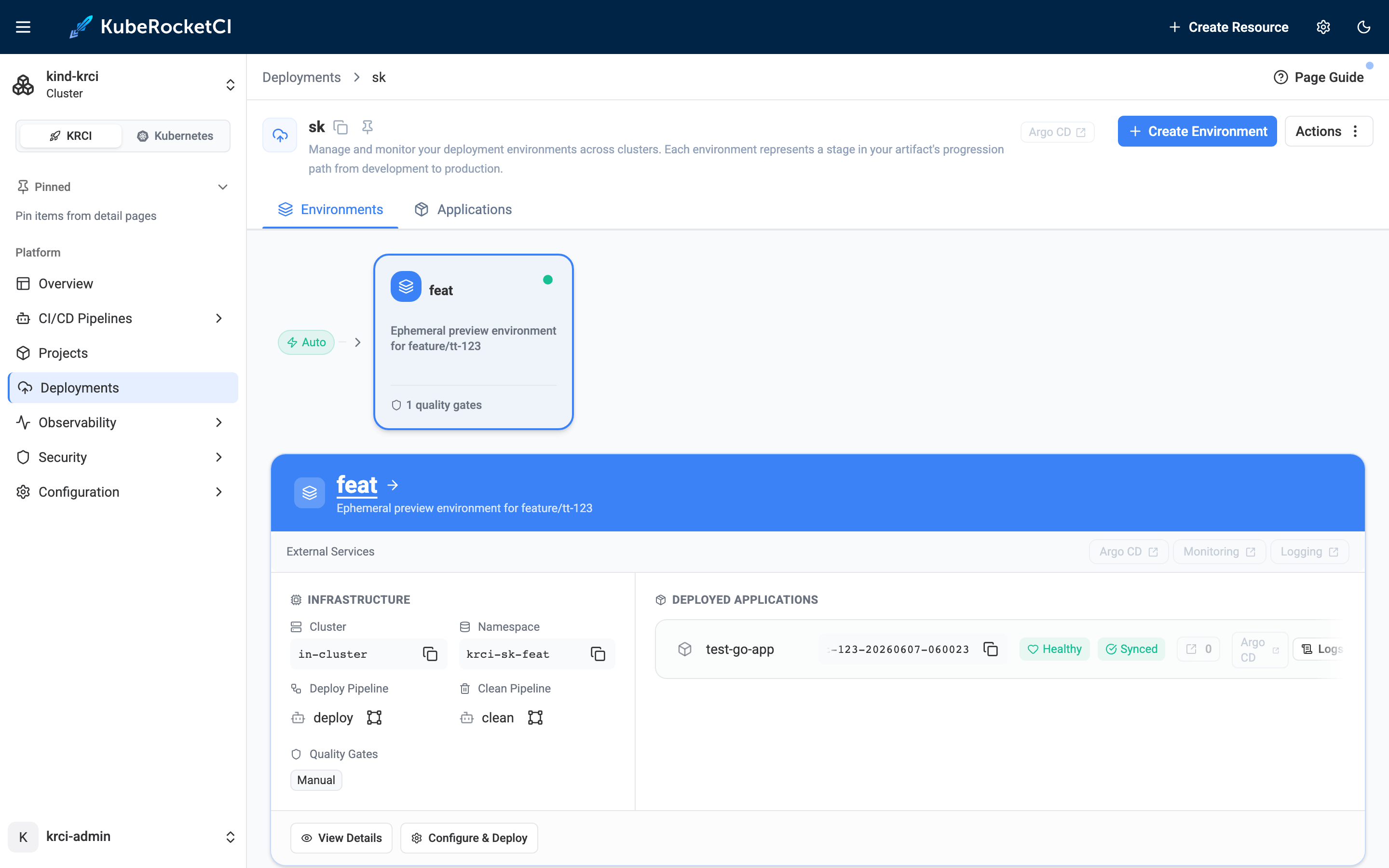
The cluster agrees:
$ kubectl -n krci get pipelinerun | grep sk-feat
deploy-sk-feat-pjsxx   True   Succeeded

$ kubectl get applications -n krci
NAMESPACE   NAME                  SYNC STATUS   HEALTH STATUS
krci        demo-dev-test-go-app  Synced        Healthy   # main, untouched
krci        sk-feat-test-go-app   Synced        Healthy   # the new preview env

$ kubectl -n krci-sk-feat get deploy,pods
NAME                          READY   UP-TO-DATE   AVAILABLE
deployment.apps/test-go-app   1/1     1            1
NAME                               READY   STATUS
pod/test-go-app-666f6c6994-rltdl   1/1     Running
Step 6: Proof of Isolation - Feature Gets 200, Main Gets 404
This is the part no one publishes with real output. Two namespaces, two image tags, two versions of the code, running side by side on the same cluster:
$ kubectl -n krci-demo-dev get deploy test-go-app -o jsonpath='{..image}'
...test-go-app:main-20260606-132413@sha256:a39d120b...        # main

$ kubectl -n krci-sk-feat get deploy test-go-app -o jsonpath='{..image}'
...test-go-app:feature-tt-123-20260607-060023@sha256:812a57de...  # feature
And the behavioral proof - same path, two answers:
# feature env (krci-sk-feat)  ->  GET /
HTTP/1.1 200 OK
{"name":"","status":"ok"}

# main env (krci-demo-dev)    ->  GET /
HTTP/1.1 404 Not Found

# sanity: both still serve /hello
feature  /hello -> 200  {"message":"Hello, World!"}
main     /hello -> 200  {"message":"Hello, World!"}
The feature branch's new code is live in krci-sk-feat and answers 200. The exact same request to main in krci-demo-dev still returns 404. Nothing on main changed. That is the entire promise of a preview environment, demonstrated rather than asserted.
Step 7: Per-Environment Config via GitOps Values Override
Preview environments usually need their own configuration - a different feature flag, API endpoint, or, here, a NAME variable. The GitOps way to do this is a values file in the GitOps repository at the path <deployment>/<environment>/<application>-values.yaml, with Values override enabled for the environment.
extraEnv:
  - name: NAME
    value: "Hello from the sk/feat preview environment"
On the environment's Applications tab, I open Configure Deploy, flip the per-app Values override toggle, and Start Deploy:
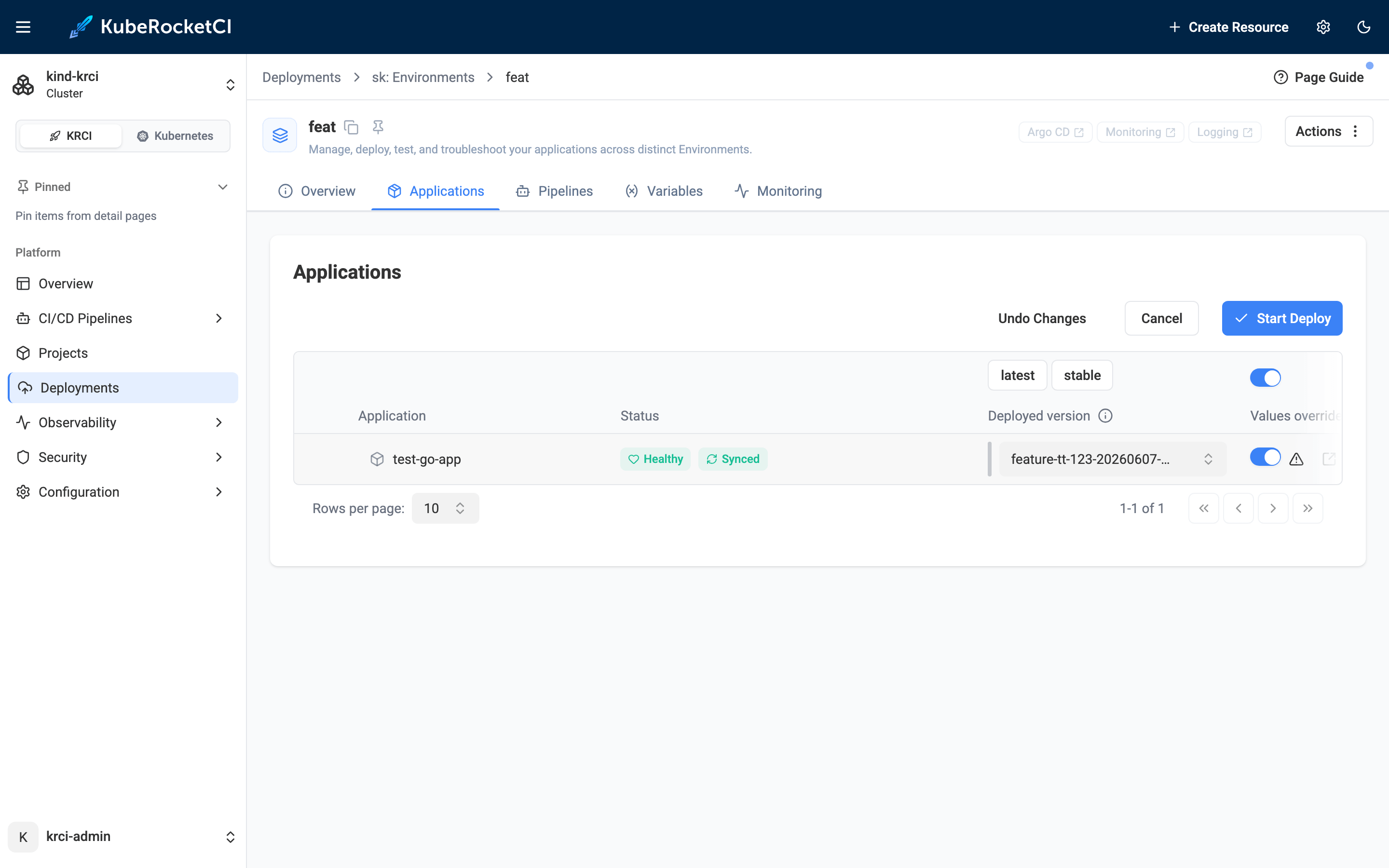
$ kubectl -n krci get pipelinerun | grep sk-feat
deploy-sk-feat-pjsxx   True   Succeeded
deploy-sk-feat-ec0e    True   Succeeded
KubeRocketCI pulls the values file from the GitOps repo and applies it to the Argo CD Application at sync time - no image rebuild required. The pod picks up the variable, and because our root handler echoes it, the override is now visible over HTTP too:
$ kubectl -n krci-sk-feat exec deploy/test-go-app -- env | grep ^NAME=
NAME=Hello from the sk/feat preview environment

# feature env GET /  (now reflects the per-environment value)
{"name":"Hello from the sk/feat preview environment","status":"ok"}

# main pod has no such variable
$ kubectl -n krci-demo-dev exec deploy/test-go-app -- env | grep ^NAME=
(no output)
Step 8: Destroy the Environment - Namespace Gone, Zero Residual Cost
Teardown is a first-class action, not a side effect of closing a PR. On the deployment, Actions → Delete asks me to type the name to confirm:
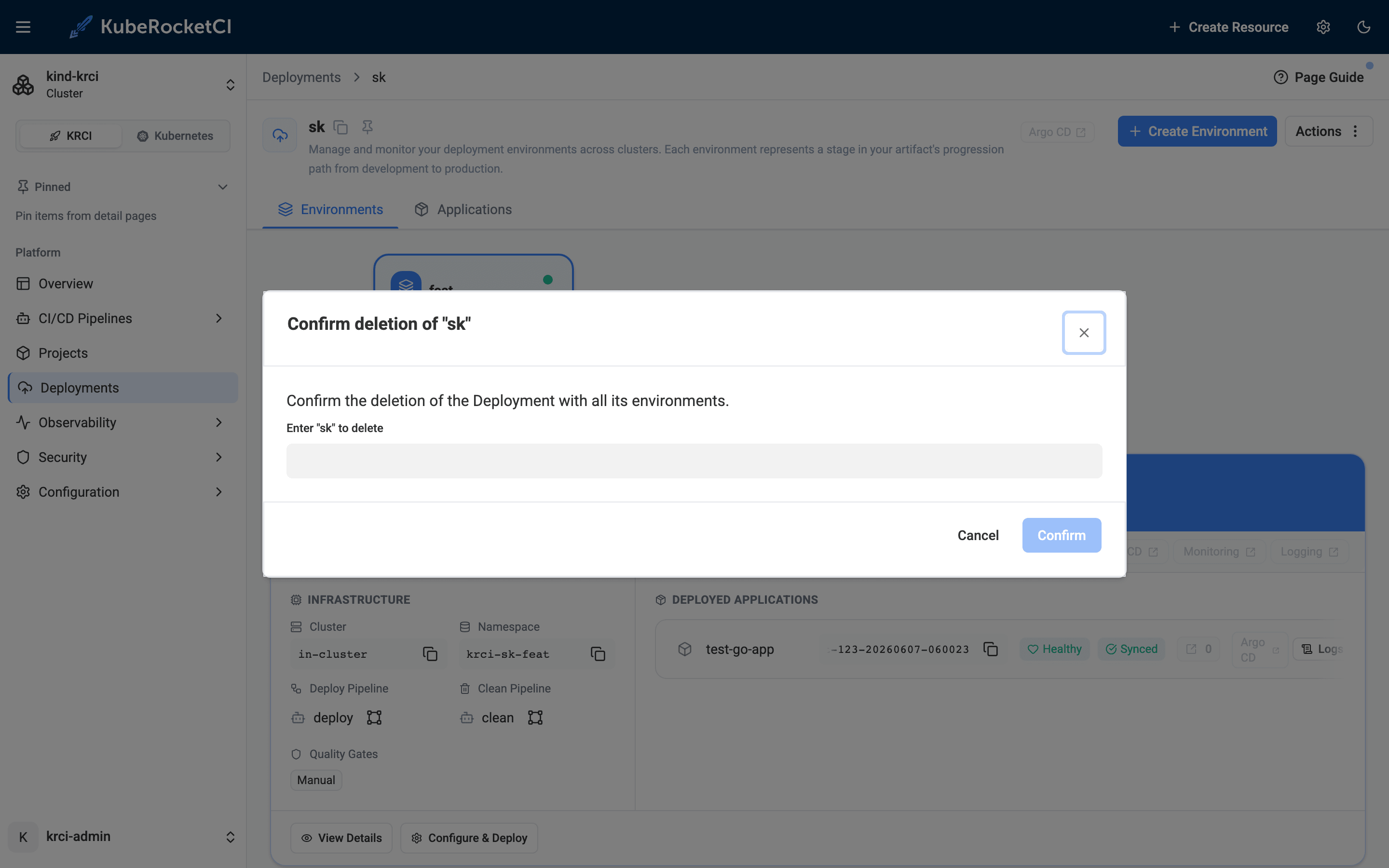
The cd-pipeline-operator deletes the namespace and its Argo CD Application. In about 5 seconds the preview environment is gone - and the main baseline is exactly as it was:
$ kubectl get ns krci-sk-feat
Error from server (NotFound): namespaces "krci-sk-feat" not found

$ kubectl get applications -n krci
NAMESPACE   NAME                   SYNC STATUS   HEALTH STATUS
krci        demo-dev-test-go-app   Synced        Healthy        # baseline intact

$ kubectl -n krci-demo-dev get deploy test-go-app
NAME          READY   UP-TO-DATE   AVAILABLE
test-go-app   1/1     1            1
Cleanup Checklist: Stage, Branch, GitOps Entry Are Independent
One thing to know: destroying the Stage does not delete the branch.
$ kubectl -n krci get codebasebranch | grep feature
test-go-app-feature-tt-123-0afaf   created   feature-tt-123     # still here
The Stage, the CodebaseBranch, the Git branch, and the GitOps values file are independent lifecycle objects. To fully clean up after a feature, delete the branch on the Branches tab and remove the <deployment>/<environment>/ entry from the GitOps repo. That independence is a feature: you can spin a preview environment up and down repeatedly for the same branch without ever touching Git history.
How Much Do Preview Environments Cost at Scale?
A preview environment on the namespace-per-branch model costs the compute its pods request, for the hours the namespace exists. There is no per-environment fee and no per-environment control plane. That makes the cost model a short formula:
cost per preview = node $/hour x (pod requests / node capacity) x hours alive
What a Real Java Preview Environment Measures
To put real numbers behind the formula, we measured a Java service built by the platform's own pipeline on this testbed — a Spring Boot 3.5.6 application on Java 17 (Eclipse Temurin 17.0.19):
- Container image: 136 MB; cold pull on the node took 4.5 s.
- Startup:
Started CiJava17MvnApplication in 0.955 seconds(JVM process up at 1.2 s). - Idle memory: 192 MB JVM RSS, 182 MB cgroup working set.
- Requests used:
cpu: 100m,memory: 384Mi, limitmemory: 512Mi.
Compute Cost per Preview, from 10 to 1,000 a Day
On an AWS m6a.large node (2 vCPU, 8 GiB, $0.0864/hour on-demand in us-east-1, as of Aug 2026), a 384Mi/100m pod occupies about 5% of the node — roughly $0.004–0.005 per preview-hour. Spot capacity roughly halves that. With an 8-hour working-day lifetime per preview and 22 working days a month:
| Previews per day | Compute per month | Control-plane fees added |
|---|---|---|
| 10 | ~$8 | $0 |
| 100 | ~$77 | $0 |
| 1,000 | ~$770 | $0 |
The control-plane column is the structural point. Namespaces share one cluster, so the EKS control-plane fee of $0.10 per cluster-hour (~$73/month; GKE charges the same) is paid once, not per environment. A cluster-per-preview model would add that $73/month for every concurrent environment; the namespace model's scaling term is pod compute alone.
How SaaS Preview Pricing Compares
For comparison, managed preview SaaS products price the orchestration, not just the compute (as of Aug 2026): Bunnyshell bills $0.007 per minute per running environment ($0.42/hour), Uffizzi bills per member with a cap of 2 concurrent environments each, and Okteto quotes team pricing through sales. Those products bundle management you would otherwise operate yourself — the comparison to make is their per-environment rate against your pod compute plus the platform-team time you already pay for.
Two costs this math excludes, honestly: the CI compute that builds the image before each preview (a Tekton pipeline run — cancelling superseded runs keeps this from multiplying on busy branches), and registry storage for per-branch image tags — both are shared-infrastructure costs that do not scale linearly with preview count.
KubeRocketCI vs. Other Preview Environment Approaches
| Capability | KubeRocketCI | Argo CD ApplicationSet (PR generator) | Uffizzi | Okteto / Qovery / Vercel (SaaS) |
|---|---|---|---|---|
| License | Apache-2.0 | Apache-2.0 | Proprietary (SaaS only since 2024) | Proprietary / freemium |
| Self-hosted | Yes | Yes | No | Control plane is SaaS |
| Builds the image | Yes (Tekton) | No - deploy only | Yes | Yes |
| GitOps CD | Yes (Argo CD) | Yes (Argo CD) | No (Compose/Helm) | Varies |
| Developer Portal UI | Yes | No (YAML) | Limited | Yes |
| Per-branch namespace | Yes | Yes | Yes | Yes |
| Per-env values override | Yes (GitOps) | Manual | Limited | Yes |
| One-click destroy | Yes | Manual | Yes | Yes |
| Cost per environment | Compute only | Compute only | Compute only | Per-env / per-seat fees |
The Argo CD ApplicationSet PR Generator: Powerful, but Incomplete
The Argo CD ApplicationSet Pull Request generator is the closest pure-OSS pattern, and it is genuinely useful - it watches open PRs and creates an Argo CD Application for each. But it is a deployment tool only: it does not build container images. The CI pipeline must build and push the tagged image first, and if the ApplicationSet reconciles before the image exists, the pods hit ImagePullBackOff. KubeRocketCI sidesteps that ordering problem with the CodebaseImageStream handoff described earlier - Tekton writes the tag, and the Auto trigger only fires once it is there. You also get a Portal, a Build button, and a Destroy button instead of hand-written ApplicationSet YAML.
Why SaaS Preview Tools Don't Cover Full-Stack Kubernetes
Vercel and Netlify nail preview deployments for frontend/static workloads, and Qovery/Okteto/Bunnyshell offer polished managed experiences - but they put a SaaS control plane (and a per-environment or per-seat bill) between you and your cluster. Demand is real, but the tooling still frustrates teams: in Port's 2025 State of Internal Developer Portals survey, just 6% of developers were satisfied with the self-service tooling they use to spin up environments on demand. The open question that leaves is how to get that developer experience on your own cluster, with no SaaS bill - exactly the gap an Apache-2.0 IDP like KubeRocketCI fills.
Frequently Asked Questions
What is the difference between a preview environment and an ephemeral environment?
They are used interchangeably. "Preview environment" emphasizes the use case - reviewing a feature branch before merge - while "ephemeral environment" emphasizes the lifecycle: it is temporary and torn down when done. In KubeRocketCI both refer to the same object: a Deployment Stage with its own isolated Kubernetes namespace, created for a branch and destroyed on demand.
Do I need a SaaS subscription to get preview environments on Kubernetes?
No. KubeRocketCI is Apache-2.0 open source and runs entirely on your own cluster - kind locally, or EKS/GKE/AKS in production. There is no per-environment fee and no SaaS control plane. You bring the cluster; KRCI provides the Portal, CI (Tekton), and GitOps CD (Argo CD) to manage the full preview-environment lifecycle.
Does setting up ephemeral environments require YAML expertise?
Not for the day-to-day flow. Creating a branch, building it, and deploying to an isolated namespace are all Portal form actions. The only YAML you write is the optional per-environment values file in the GitOps repo - and only when you actually need to override a value for a specific preview. The CDPipeline and Argo CD Application resources are managed by KRCI operators.
How does per-environment configuration override work in a GitOps workflow?
You add a file at <deployment>/<environment>/<application>-values.yaml in the GitOps repository - for example sk/feat/test-go-app-values.yaml - containing Helm values that override the application's defaults. Enable the Values override toggle on the environment, then deploy. KubeRocketCI applies those values to the Argo CD Application at sync time, so the pod reflects them without rebuilding the image.
What happens to the namespace when I delete the environment in KRCI?
The cd-pipeline-operator deletes the Kubernetes namespace and the associated Argo CD Application - all pods, services, and configmaps in that namespace are removed. The CodebaseBranch and the Git branch are separate objects, so destroying the Stage does not delete or merge the branch; clean those up separately if you want to.
Does the Argo CD ApplicationSet Pull Request generator build container images?
No. It is a deployment tool that watches open pull requests and creates Argo CD Applications for them. Your CI pipeline (Tekton, GitHub Actions, GitLab CI) must build and push the image first. If the ApplicationSet fires before the image is ready, pods hit ImagePullBackOff. KubeRocketCI avoids this with the CodebaseImageStream handoff: Tekton writes the tag, and the Auto trigger deploys only after it exists.
How much does it cost to run ephemeral environments on Kubernetes with KubeRocketCI?
The cost of an ephemeral environment is its pod compute for the hours it exists: node price multiplied by the share of the node the pods request, multiplied by lifetime. KubeRocketCI is Apache-2.0, so there is no per-environment or per-seat fee, and namespaces share one cluster, so the control-plane fee (about $73/month on EKS or GKE, as of Aug 2026) is paid once regardless of environment count. Measured on this testbed, a Spring Boot 3.5 / Java 17 service idles at 192 MB RSS; with 384Mi/100m requests on an on-demand m6a.large node that works out to roughly $0.004–0.005 per preview-hour — about $77/month of compute for 100 previews a day at an 8-hour lifetime. The cost-at-scale section above shows the formula, the table, and the SaaS per-environment rates to compare against.
Our CI spins up a full preview environment of 40 Java microservices per pull request, and JVM startup makes every preview take 15 minutes. What can we do?
Stop deploying all 40. A preview environment only needs the services the pull request changed: in KubeRocketCI the environment's content is the application list of its deployment flow, so a preview can contain just the changed service (plus direct dependencies), with cross-service calls pointed at the stable shared environment through per-environment GitOps values overrides. That turns a 40-service cold start into a one-service deploy — measured here, a Spring Boot 3.5 service starts in under a second and its 136 MB image pulls in 4.5 s cold. For the JVM startup itself, CDS archives and unpacked-jar packaging, Spring AOT, JVM checkpoint/restore (CRaC), or GraalVM native images are application-level fixes that also pay off in production, and cancelling superseded pipeline runs stops stale previews from consuming build capacity while a newer commit is already on the way.
Summary
Starting from a stable main deployment, we created a feature branch in the Portal, shipped a change visible only on that branch, built it through Tekton, and let an Auto environment deploy it to its own isolated namespace through Argo CD GitOps. We proved the isolation with real output - feature returns 200, main keeps returning 404 - injected per-environment config through a GitOps values override, and then destroyed the environment in one action, leaving the baseline untouched and zero residual cost behind.
No SaaS bill, no hand-written ApplicationSet YAML, no kubectl required for the happy path - just a feature branch, a few portal clicks, and a real isolated Kubernetes environment that cleans up after itself. The pattern - feature branch deployment on Kubernetes with isolated namespaces - is entirely self-hosted and free. I ran the entire flow on June 7, 2026 on the local try-kuberocketci testbed; every screenshot and command output above is from that run.
The most useful next steps from here:
- Spin up the testbed yourself with Try KubeRocketCI Locally, then follow this flow on your own machine.
- Read the Deploy Application From a Feature Branch use case and Manage Deployments for the full reference.
- Explore Deployment Strategies (Manual, Auto, Auto-stable) and the Argo CD Diff preview for gated promotions.
- See the deeper Kubernetes-native CI/CD with Tekton architecture and the krci CLI for driving all of this from the terminal.
KubeRocketCI is open source under Apache License 2.0. The platform, Helm charts, and the testbed are all on GitHub.