Stale Branch Cleanup on Kubernetes: Keep Your Platform in Sync with Git

Every feature branch you create in KubeRocketCI becomes a CodebaseBranch resource in Kubernetes - the object that drives its CI pipelines, records its built images, and feeds ephemeral preview environments. But when that branch merges and someone deletes it in GitLab or GitHub, the Kubernetes side never hears about it. The CodebaseBranch lives on: it clutters the Portal, offers a Build button for a branch that no longer exists, and on a busy platform these orphans accumulate by the hundreds.
KubeRocketCI 3.14 closes that gap. The codebase-operator now periodically verifies every branch against the real git repository, marks missing ones with a Stale condition (and a badge in the Portal), and - if you opt in - deletes them automatically, while refusing to touch any branch that is still wired into a deployment. This post shows the whole lifecycle live on the local try-kuberocketci testbed: every screenshot and command output below is from a real run.
Why Stale Branches Accumulate
The branch-per-feature workflow that makes preview environments so effective is also what produces the litter. The lifecycle of a healthy feature branch ends with a merge and a git branch -d - usually a checkbox in the merge request. That deletion happens in git. The platform objects created for the branch - the CodebaseBranch resource, its CodebaseImageStream (the record of images built from it) - are Kubernetes resources, and nothing in the git provider tells Kubernetes to remove them.
The result is drift between two sources of truth:
- The Portal shows branches that do not exist. New team members trigger builds against them and get confusing clone failures.
- Resources pile up. Platforms with dozens of codebases and a branch-per-ticket habit accumulate hundreds of dead
CodebaseBranchandCodebaseImageStreamobjects. - Nobody knows which ones are safe to delete. A
CodebaseBranchmay look abandoned and still be the input of a live deployment - deleting the wrong one breaks an environment.
Manual cleanup does not scale, and a naive cron that deletes anything old is dangerous. What you want is exactly what a Kubernetes operator is for: continuously observe external state (git), record it on the resource, and act on it with guardrails.
How Stale Branch Detection Works
The codebase-operator runs a stale branch checker - a leader-elected background loop, not a webhook - because branch deletion in git produces no Kubernetes event to react to. On every tick it makes one cheap git ls-remote call per repository (no cloning, no working tree) and compares the listed branches against the CodebaseBranch resources in the namespace:
The verdict is recorded in three places, so both humans and tooling can consume it:
- A
Stalestatus condition on theCodebaseBranch- the source of truth, with a reason (BranchNotFoundInGit) and a human-readable message. - The
app.edp.epam.com/stalelabel, mirroring the condition so you can filter with a plain label selector. - Kubernetes events (
BranchStale,StaleBranchDeleted,StaleBranchRetained,BranchStaleResolved) for audit trails and alerting.
Just as important is what the checker will not do:
- No marking on infrastructure errors. If the git server is unreachable or credentials are rejected, the sweep skips that repository entirely - a GitLab outage will never mass-mark your branches.
- Default branches are never checked.
maincannot go stale. - Branches not yet pushed or already terminating are skipped.
- A branch that reappears in git is un-marked on the next sweep (
BranchStaleResolved).
Detection is always on and needs no configuration - the interval defaults to 24 hours (branchStaleCheckInterval Helm value; 0 disables the checker). Cleanup is a separate, opt-in decision per codebase, which we will get to below.
Walkthrough: Marking Stale Branches on a Live Cluster
The setup is the same local testbed as the preview environments post: a kind cluster with KubeRocketCI, Tekton, Argo CD, and a self-hosted GitLab, with the sample Go application test-go-app already onboarded. The only deviation from defaults: I set the check interval to 2m so the demo does not wait a day between sweeps.
The operator confirms the checker is running on startup:
INFO  stale-branch-checker  Starting stale branch checker  {"interval": "2m0s"}
INFO  stale-branch-checker  Listing remote branches  {"repository": "git@gitlab.127.0.0.1.nip.io:krci/test-go-app.git"}
INFO  stale-branch-checker  Remote branches listed successfully  {"count": 2}
INFO  stale-branch-checker  Codebase branches staleness check finished  {"codebases": 2}
Step 1: Create Two Feature Branches
In the test-go-app component: Branches → Create Branch. I create feature-tt-123 and feature-tt-456 from main, keeping the default pipelines.
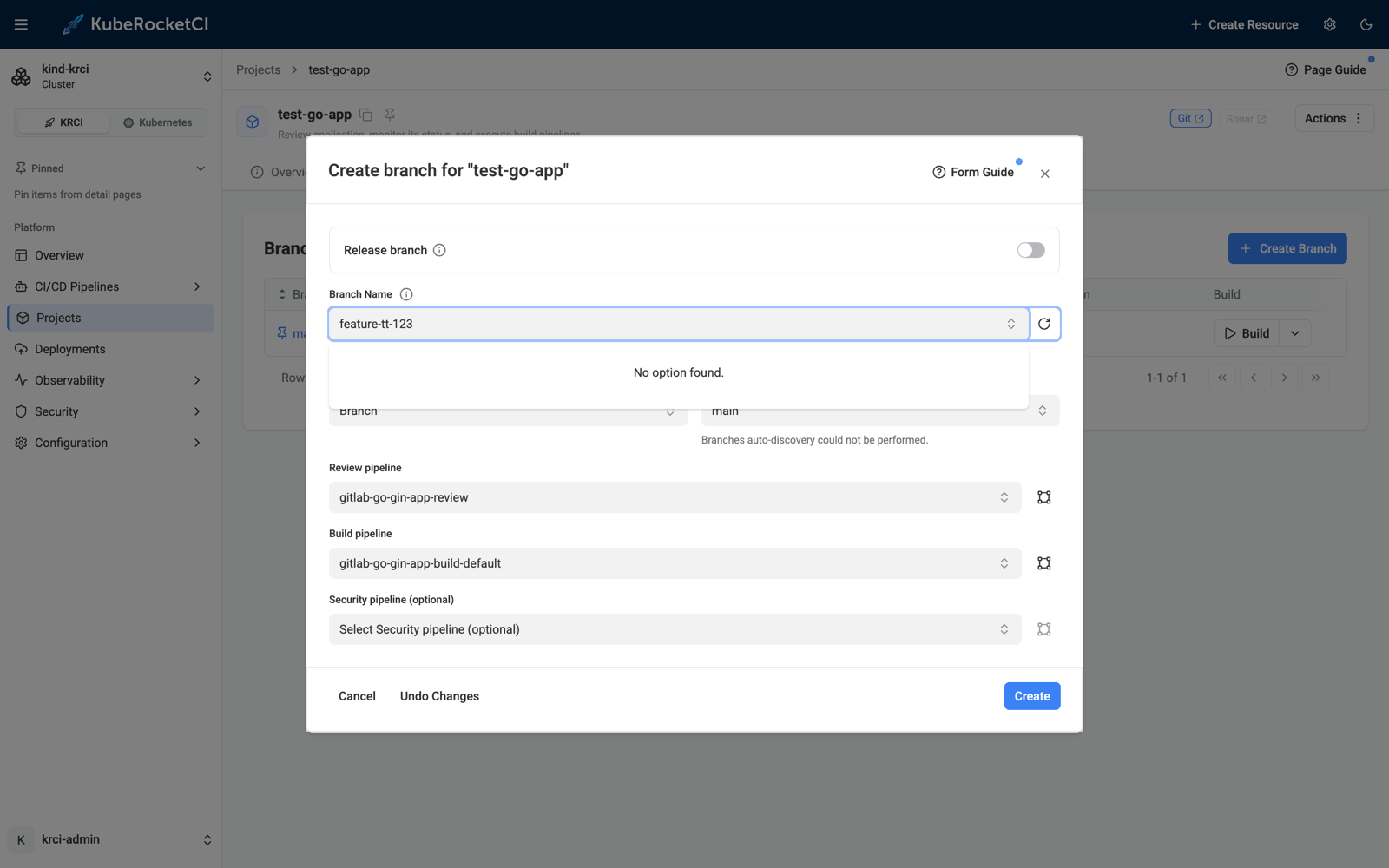
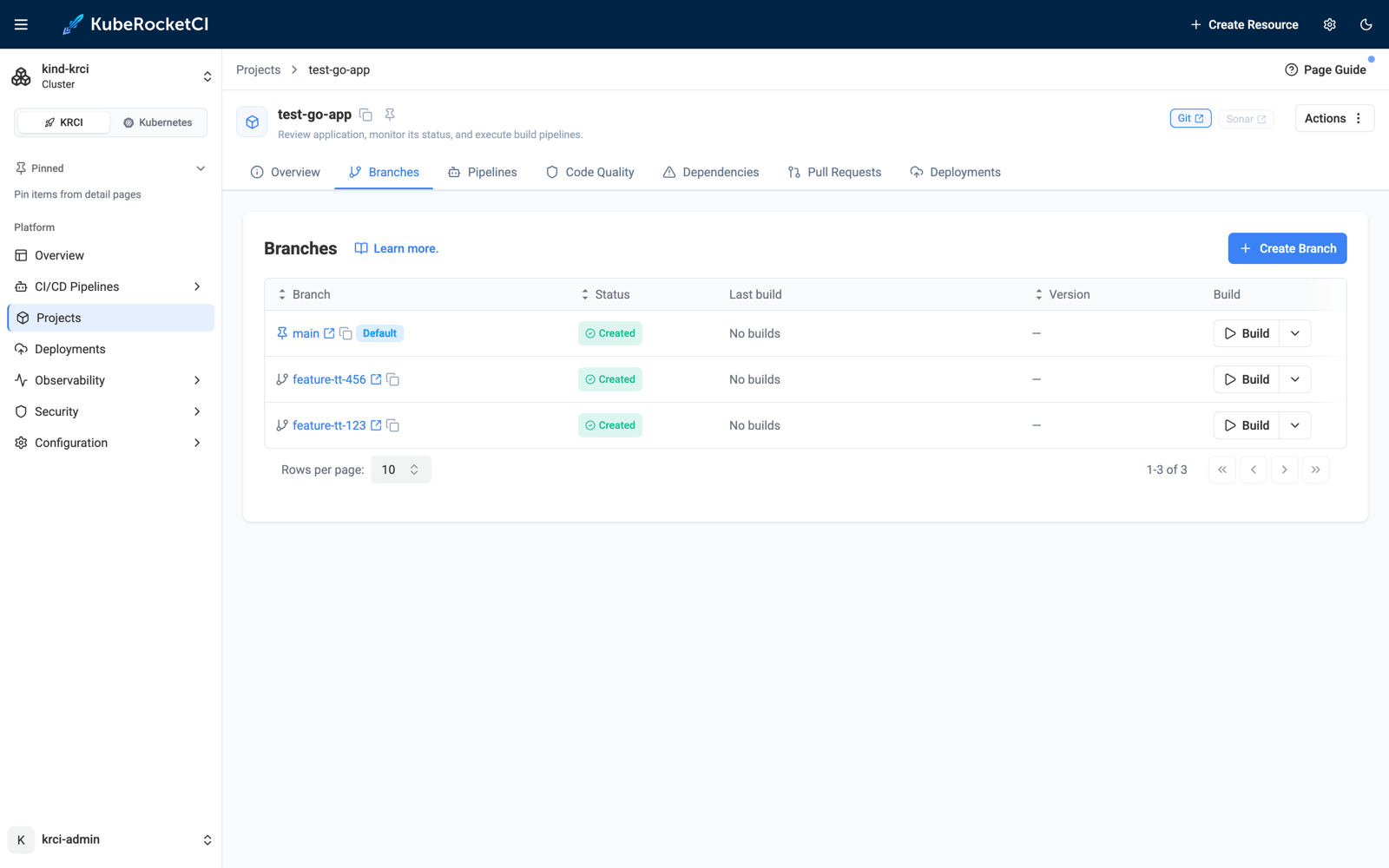
Each click creates a CodebaseBranch resource and pushes the branch to GitLab. Note the new STALE column on the resource - empty for now, because every branch exists in git:
$ kubectl -n krci get codebasebranch
NAME                               RESULT    STATUS    CODEBASE NAME   BRANCH           STALE
krci-gitops-main                   success   created   krci-gitops     main
test-go-app-feature-tt-123-02e67   success   created   test-go-app     feature-tt-123
test-go-app-feature-tt-456-045fe   success   created   test-go-app     feature-tt-456
test-go-app-main                   success   created   test-go-app     main
Step 2: Delete a Branch in Git - and Watch It Get Marked
Now the everyday event this feature exists for: the branch is merged and removed in the git provider - the "delete source branch" checkbox on a merge request, or an explicit API call. I delete feature-tt-123 straight in GitLab:
$ curl -X DELETE -H "PRIVATE-TOKEN: $PAT" \
    "https://gitlab.127.0.0.1.nip.io/api/v4/projects/krci%2Ftest-go-app/repository/branches/feature-tt-123"
# HTTP 204
Kubernetes knows nothing about this - until the next sweep. Within two minutes:
$ kubectl -n krci get codebasebranch
NAME                               RESULT    STATUS    CODEBASE NAME   BRANCH           STALE
krci-gitops-main                   success   created   krci-gitops     main
test-go-app-feature-tt-123-02e67   success   created   test-go-app     feature-tt-123   True
test-go-app-feature-tt-456-045fe   success   created   test-go-app     feature-tt-456   False
test-go-app-main                   success   created   test-go-app     main
The condition carries the full story:
{
  "type": "Stale",
  "status": "True",
  "reason": "BranchNotFoundInGit",
  "message": "Branch was not found in the git repository",
  "lastTransitionTime": "2026-07-13T10:33:09Z"
}
An event is emitted for the audit trail, and the mirrored label makes fleet-wide queries trivial:
$ kubectl -n krci get events --field-selector involvedObject.name=test-go-app-feature-tt-123-02e67
LAST SEEN   TYPE      REASON        MESSAGE
86s         Warning   BranchStale   Branch feature-tt-123 was not found in the git repository and is marked as stale

$ kubectl -n krci get codebasebranch -l app.edp.epam.com/stale=true
NAME                               ...   BRANCH           STALE
test-go-app-feature-tt-123-02e67   ...   feature-tt-123   True
The Portal surfaces the same information as a warning badge in the branch list - hover it and the tooltip shows the condition message:
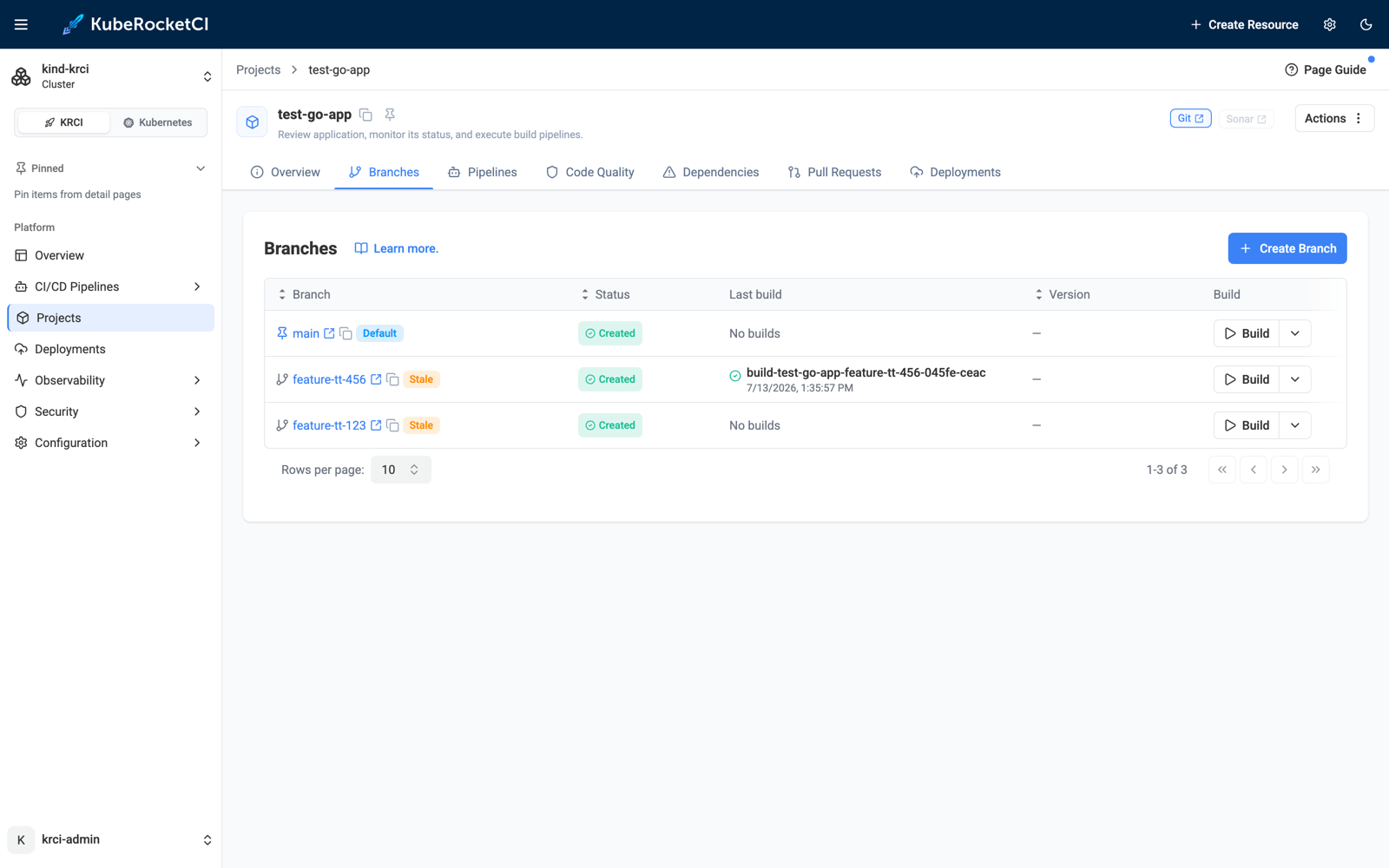
At this point nothing has been deleted - the default cleanup strategy is mark: make staleness visible, let a human decide. For many teams that is already the win. But we can go further.
Auto Cleanup - With a Deployment-Aware Safety Net
Before turning on automatic deletion, let's build the exact scenario that makes naive cleanup dangerous: a stale branch that is still deployed.
Following the preview environment flow, I build feature-tt-456 and create a Deployment named preview with an Auto-triggered dev environment consuming that branch's image stream:
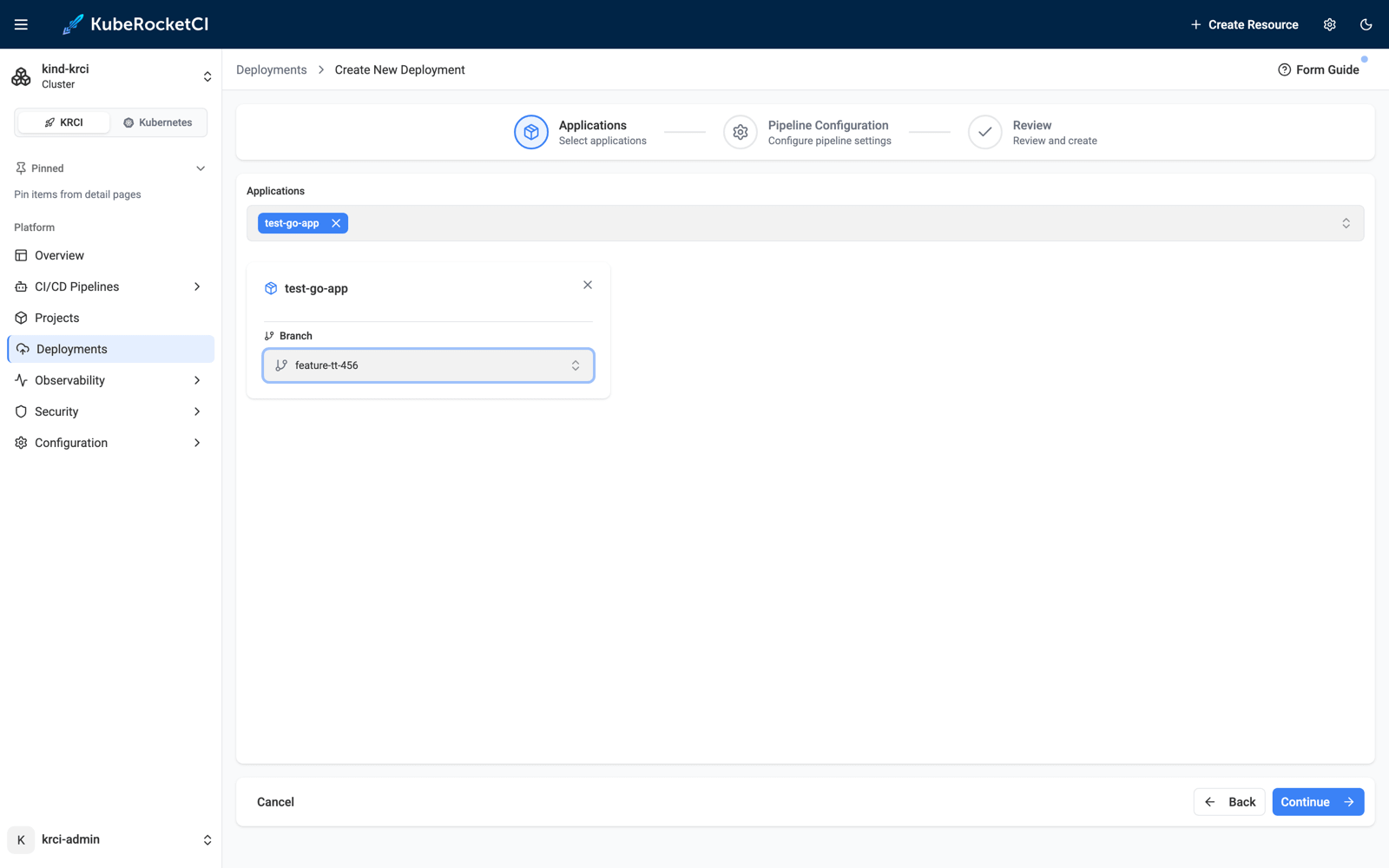
After the deploy pipeline finishes, the preview environment is live in its own namespace, running the image built from feature-tt-456:
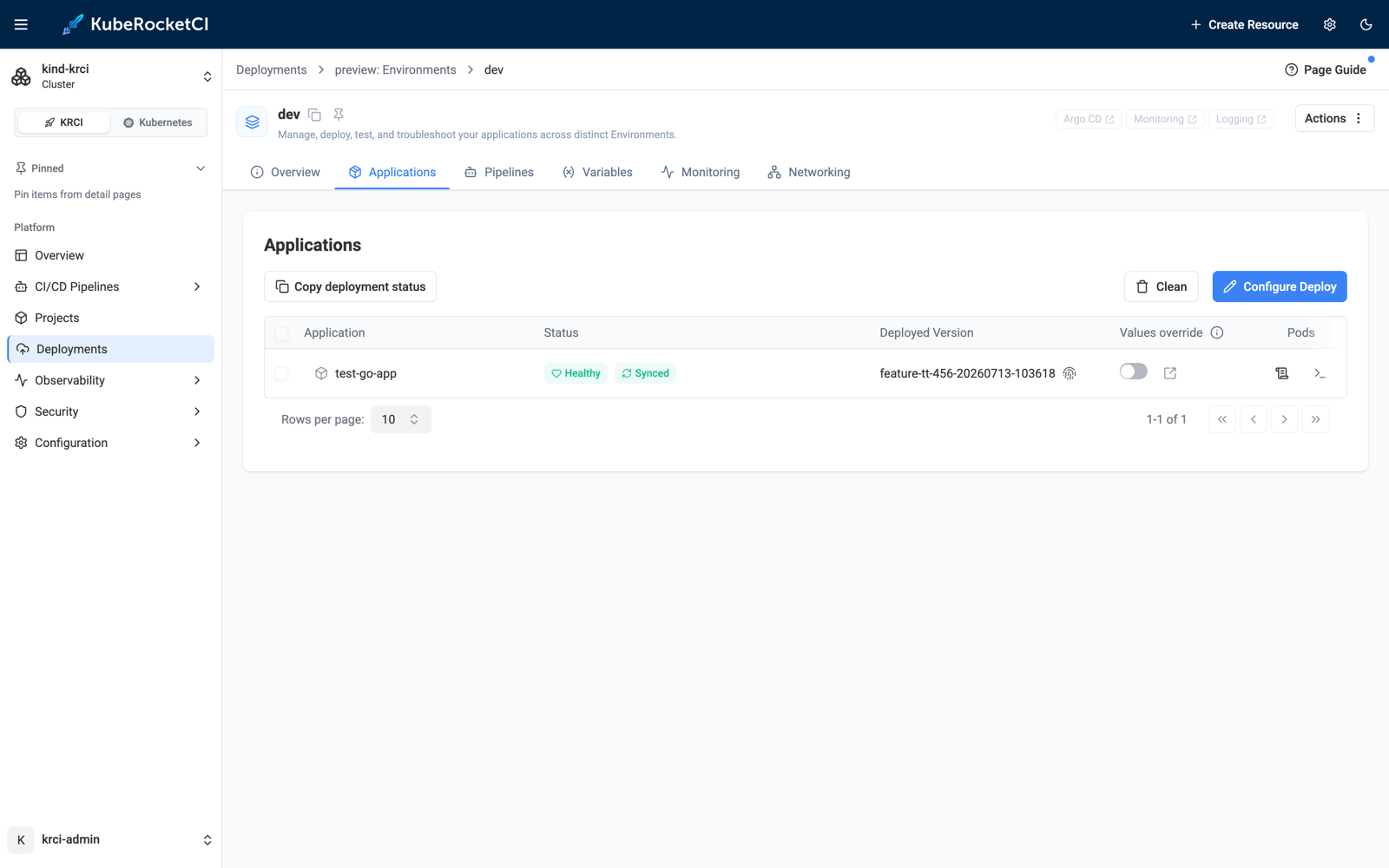
Now I delete feature-tt-456 in GitLab too. Next sweep: both branches are stale - but one of them is backing a running environment.
Guardrail 1: The Admission Webhook
Even a well-meaning human with kubectl cannot break the deployment by "cleaning up" the stale branch. The codebase-operator's admission webhook now rejects deleting any CodebaseBranch that participates in a deployment (a rule the Portal used to enforce only client-side):
$ kubectl -n krci delete codebasebranch test-go-app-feature-tt-456-045fe
Error from server (Forbidden): admission webhook "codebasebranch.epam.com" denied the request:
CodebaseBranch test-go-app-feature-tt-456-045fe cannot be deleted because it is used by
CDPipeline preview (inputDockerStreams); remove it from the deployment first
Guardrail 2: Retention in Auto Cleanup
Automatic cleanup is opt-in per codebase, via a single annotation:
$ kubectl -n krci annotate codebase test-go-app app.edp.epam.com/branch-cleanup-strategy=auto
With auto, the next sweep deletes stale branches that nothing references - and retains the ones that a CDPipeline (or a Stage autotest quality gate) still uses. One sweep later, the two stale branches got exactly opposite treatment:
$ kubectl -n krci get events --sort-by=.lastTimestamp | grep Stale
Warning   BranchStale          Branch feature-tt-456 was not found in the git repository and is marked as stale
Normal    StaleBranchDeleted   Branch feature-tt-123 was not found in the git repository and is not used by any deployment, deleting

$ kubectl -n krci get codebasebranch
NAME                               RESULT    STATUS    CODEBASE NAME   BRANCH           STALE
krci-gitops-main                   success   created   krci-gitops     main
test-go-app-feature-tt-456-045fe   success   created   test-go-app     feature-tt-456   True
test-go-app-main                   success   created   test-go-app     main
feature-tt-123 is gone, and because the CodebaseBranch owns its CodebaseImageStream, the image stream was garbage-collected with it - no orphaned children. feature-tt-456 stays, and its condition message names the exact resource that is keeping it alive:
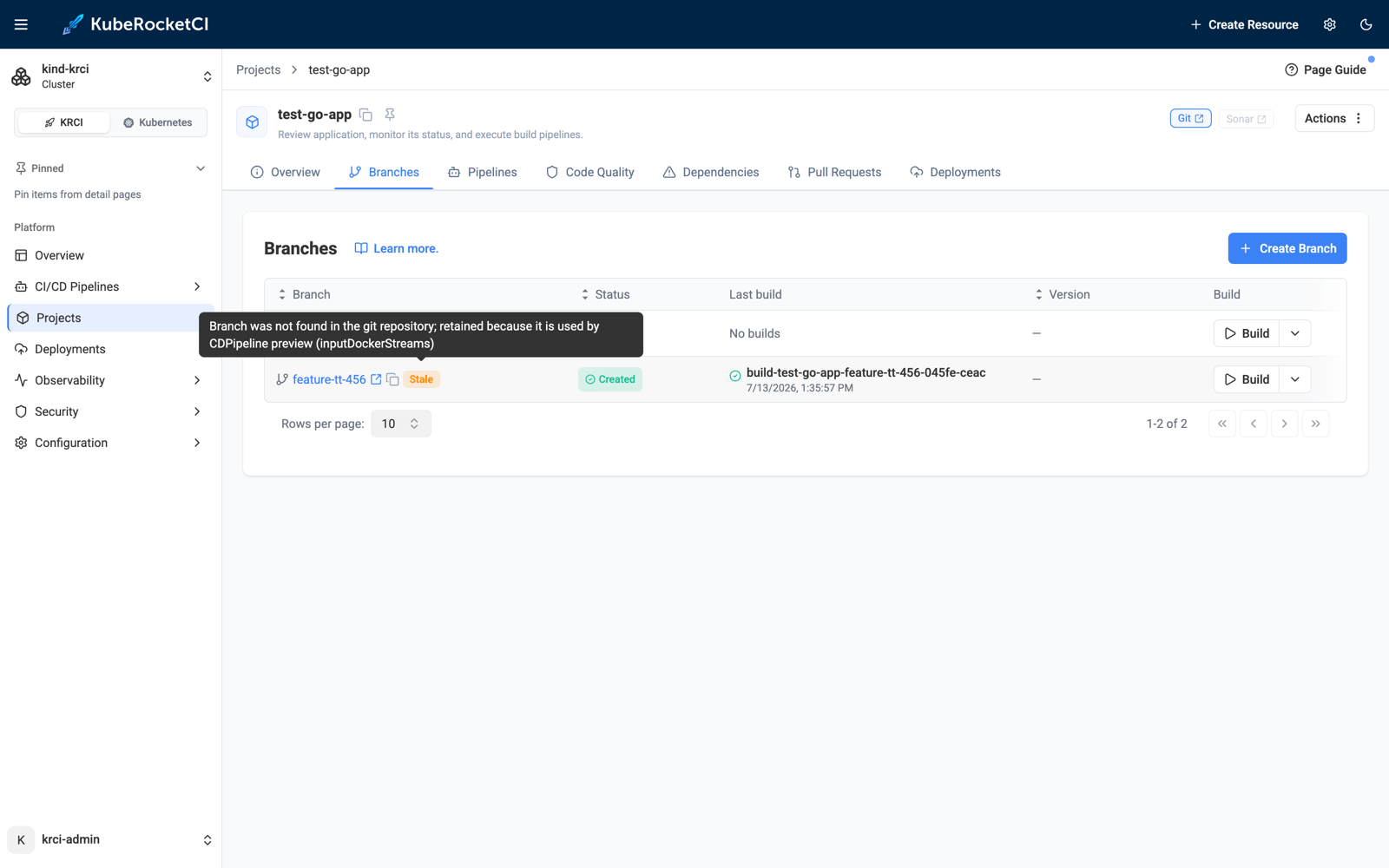
Branch was not found in the git repository; retained because it is used by CDPipeline preview (inputDockerStreams)
The Portal tooltip shows the same reason, so the "why is this still here?" question answers itself:
Releasing the Hold
The retained branch is cleaned up the moment it stops being needed. I remove the preview Deployment in the Portal (Actions → Delete, type the name to confirm) - which, as covered in the previous post, tears down the environment namespace and the Argo CD Application:
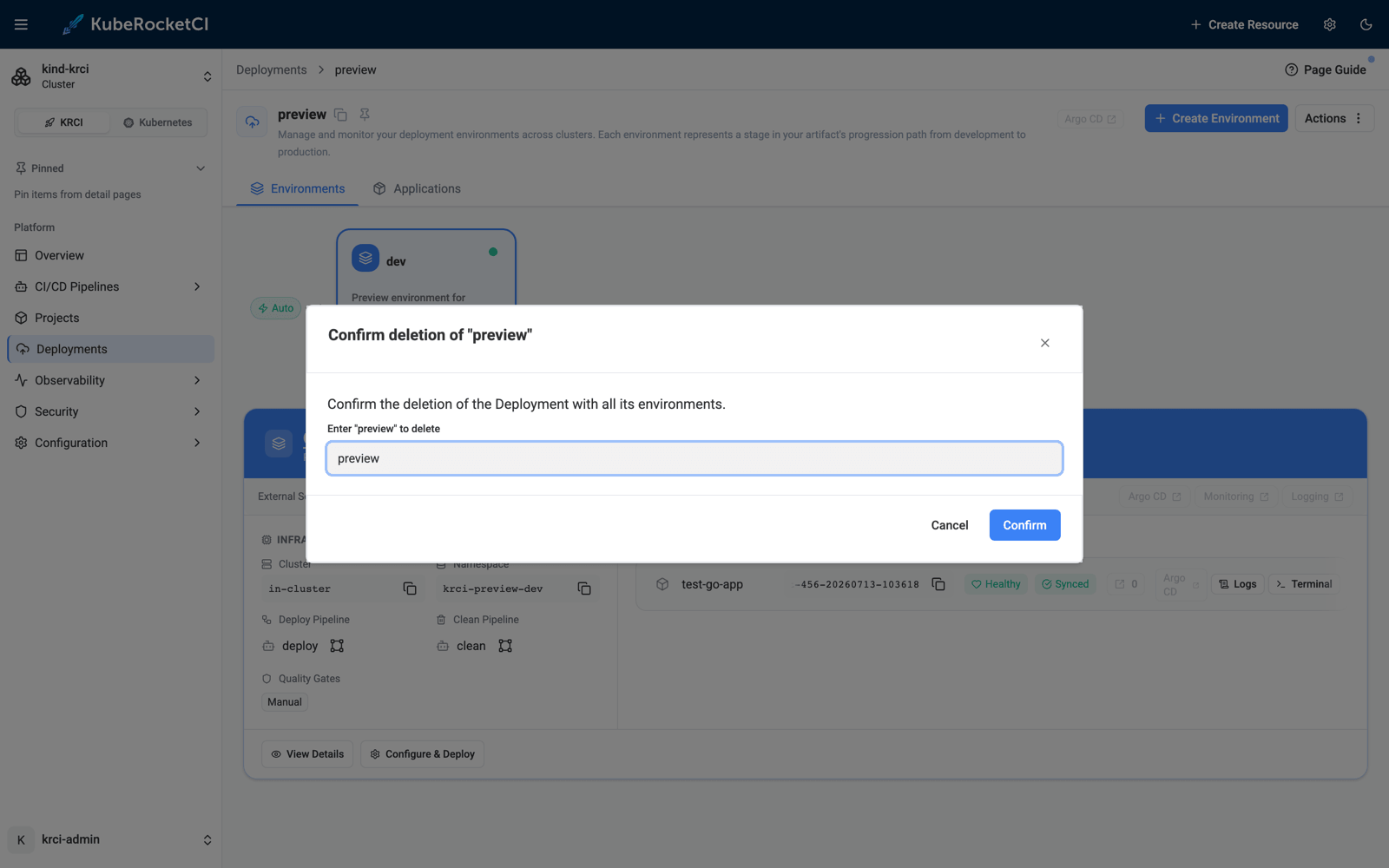
Next sweep, the last stale branch goes too:
$ kubectl -n krci get events --sort-by=.lastTimestamp | grep StaleBranchDeleted
Normal   StaleBranchDeleted   Branch feature-tt-123 ... not used by any deployment, deleting
Normal   StaleBranchDeleted   Branch feature-tt-456 ... not used by any deployment, deleting

$ kubectl -n krci get codebasebranch
NAME               RESULT    STATUS    CODEBASE NAME   BRANCH   STALE
krci-gitops-main   success   created   krci-gitops     main
test-go-app-main   success   created   test-go-app     main
The platform is back to exactly what git says it should be - no manual bookkeeping, and at no point could the cleanup have taken down a running environment.
Configuration Reference
| Setting | Where | Default | Effect |
|---|---|---|---|
branchStaleCheckInterval | codebase-operator Helm values (env BRANCH_STALE_CHECK_INTERVAL) | 24h | Sweep interval; 0 disables detection entirely |
app.edp.epam.com/branch-cleanup-strategy | Annotation on a Codebase | mark | mark = only flag stale branches; auto = delete unreferenced stale branches |
app.edp.epam.com/stale label | Set by the operator on CodebaseBranch | - | Mirrors the Stale condition for label-selector queries |
Events emitted by the checker:
| Event reason | Type | Meaning |
|---|---|---|
BranchStale | Warning | Branch missing in git, marked as stale |
BranchStaleResolved | Normal | Branch reappeared in git, mark removed |
StaleBranchDeleted | Normal | Auto cleanup deleted an unreferenced stale branch |
StaleBranchRetained | Warning | Stale branch kept because a deployment references it |
Handy one-liners:
# All stale branches across the platform namespace
kubectl -n krci get codebasebranch -l app.edp.epam.com/stale=true

# Why is this branch still around?
kubectl -n krci get codebasebranch <name> -o jsonpath='{.status.conditions[?(@.type=="Stale")].message}'
Frequently Asked Questions
What marks a CodebaseBranch as stale in KubeRocketCI?
A periodic checker in the codebase-operator lists the repository's branches with git ls-remote and compares them against the CodebaseBranch resources. If a branch no longer exists in the git repository, the resource gets a Stale status condition (reason BranchNotFoundInGit), the app.edp.epam.com/stale label, a Kubernetes event, and a warning badge in the Portal.
Can the default branch ever be marked stale or deleted?
No. Default branches (for example main) are excluded from staleness checks entirely, as are branches that have not been pushed yet and branches already being deleted.
What happens if GitLab or GitHub is down during a sweep?
Nothing. The checker never marks branches when the repository listing fails - connectivity problems, DNS errors, or rejected credentials cause the repository to be skipped for that sweep. Only a successful listing that positively lacks the branch produces a stale mark.
Does stale detection delete branches automatically?
Not by default. Out of the box the strategy is mark: branches are flagged and left for a human. Automatic deletion is enabled per codebase with the app.edp.epam.com/branch-cleanup-strategy: auto annotation, and even then a stale branch referenced by a CDPipeline or a Stage quality gate is retained, with the retaining resource recorded in the condition message.
Can a stale branch that is still deployed be deleted by mistake?
No - two independent guardrails prevent it. Auto cleanup skips any branch referenced by a deployment, and the codebase-operator's admission webhook rejects manual deletion (kubectl delete, API calls) of a CodebaseBranch that participates in a deployment, naming the CDPipeline in the error message.
What happens to the images built from a deleted branch?
The CodebaseBranch owns its CodebaseImageStream, so when auto cleanup deletes the branch resource, Kubernetes garbage collection removes the image stream record with it. The container images themselves stay in your registry - registry retention is a separate concern.
How do I find all stale branches across the platform?
kubectl get codebasebranch -l app.edp.epam.com/stale=true -A. The label mirrors the status condition specifically so that plain label selectors - and any tooling built on them - can find stale branches without parsing conditions.
Summary
Feature branches are ephemeral; the Kubernetes resources behind them used to be forever. With KubeRocketCI 3.14, the codebase-operator closes the loop. One git ls-remote per repository per sweep detects branches deleted from git, and a Stale condition plus label plus Portal badge make them visible. An opt-in per-codebase auto strategy deletes the ones nothing depends on - while an admission webhook and a deployment-aware retention check make sure the cleanup can never take down a running environment.
In this run we created two branches, deleted them in GitLab at different points of their lifecycle, and watched the operator mark one, auto-delete it, retain the other while its preview environment was alive, and finish the job the moment the environment was gone - ending with a platform that matches git exactly.
Next steps from here:
- Spin up the same environment with Try KubeRocketCI Locally and replay the flow - the whole demo fits in a lunch break.
- Read Manage Branches for the day-to-day branch workflow in the Portal.
- See Ephemeral Environments on Kubernetes for the preview-environment lifecycle that produces these branches in the first place.
- Explore the codebase-operator on GitHub - the stale checker lives in
controllers/codebasebranch/stalecheck/.
KubeRocketCI is open source under Apache License 2.0. The platform, Helm charts, and the local testbed are all on GitHub.