Kubernetes-Native CI/CD with Tekton: How KubeRocketCI Works

Building CI/CD on Kubernetes used to mean running Jenkins or GitLab CI in a pod and calling it done. Tekton changed that by making pipelines first-class Kubernetes objects - Tasks and Pipelines are CRDs, PipelineRuns are namespaced resources, and every step log is a container log. KubeRocketCI goes a step further: it ships a complete, production-grade CI/CD platform on top of Tekton so your team gets sensible defaults, a portal UI, GitOps-managed pipeline definitions, and opinionated quality gates - without the months of plumbing work that comes with assembling those pieces from scratch. I've seen teams go from a bare cluster to a working build-deploy loop in under a day using this stack.
Here's how the layering works in practice - from Tekton's native primitives to the Helm-templated pipeline library, the webhook-to-PipelineRun chain, each pipeline type, and the portal UI that surfaces it all.
Why Does Kubernetes-Native CI/CD Matter?
Traditional CI servers are external systems that talk to Kubernetes. They authenticate, schedule jobs, wait for responses, and manage their own scaling independently of the cluster. Tekton turns that model inside out - the cluster is the CI engine. Every pipeline run is a pod, every step is a container, and the Kubernetes control plane handles scheduling, scaling, and secrets injection natively.
The practical consequences:
- No CI server to maintain. No Jenkins controller HA setup, no separate runner fleet. Tekton scales horizontally with your cluster.
- Uniform RBAC. Pipeline permissions use Kubernetes ServiceAccounts - no separate credential management UI.
- Pipeline as code. Pipeline definitions are YAML manifests, version-controlled alongside application code, and applied to any conformant Kubernetes cluster identically.
- Native secret injection. Tekton Tasks consume Kubernetes Secrets and ConfigMaps directly - no plugin abstraction required.
- Shift-left by default. Code quality, security scanning, and test gates run inside the cluster as ordinary containers, co-located with the workloads they protect.
KubeRocketCI and the Tekton Stack
KubeRocketCI is an open-source, cloud-agnostic SaaS/PaaS platform built on Tekton - a CNCF Graduated project - developed and maintained by EPAM Systems. Where Tekton gives you primitives, KubeRocketCI gives you a working system.
The platform deploys and manages the full Tekton component set:
| Component | Role |
|---|---|
| Tekton Pipelines | Executes all CI and CD pipeline runs |
| Tekton Triggers | Listens for Git webhook events and fires the matching pipeline |
| Tekton Interceptors | Enriches and filters GitHub, GitLab, and Bitbucket payloads before routing |
| Tekton Chains | Signs pipeline artifacts for supply-chain provenance |
| Tekton Results | Stores run history for audit trails and portal display |
On top of Tekton, KubeRocketCI adds:
- Pipeline library - Helm-packaged Tasks and Pipelines for Java, Go, Node.js, Python, .NET, Helm, Terraform, and more.
- Portal UI - full pipeline management with DAG visualization, live log streaming, and inline manual approval gates.
- Argo CD integration - pipeline definitions are stored in Git and synchronized by Argo CD. Every change to a pipeline is a reviewed, audited commit.
See Basic Concepts and the Tekton Overview for the full capability matrix.
How Are Tekton Pipelines Defined in KubeRocketCI?
The Helm-Templated Library
Pipelines in KubeRocketCI are not hand-written one-offs - they are generated by Helm from a structured library in edp-tekton. The naming convention follows:
{gitProvider}-{buildTool}-{framework}-app-{pipelineType}-{versioning}
For example, a Java 17 Maven build pipeline triggered from GitHub with default versioning renders as:
github-maven-java17-app-build-default
The same pipeline for GitLab becomes gitlab-maven-java17-app-build-default. This pattern means every combination of git provider, language, framework, and versioning strategy gets a consistently named, independently configurable pipeline - without duplicating task logic. Shared task sequences live in common Helm templates (e.g., _common_java_maven.yaml) and are included by reference.
The Real Build Task Sequence
For a Java Maven application, the build pipeline executes these tasks in order:
get-version
  └─ update-build-number
       └─ get-cache
            └─ compile
                 └─ test  (JaCoCo coverage)
                      └─ sonar  (quality gate: sonar.qualitygate.wait=true)
                           └─ build  (mvn clean package -DskipTests)
                                └─ push  (mvn deploy -DskipTests)
The sonar step blocks with sonar.qualitygate.wait=true - the build fails fast at the quality gate rather than discovering issues downstream. In my experience, this single flag is the difference between catching technical debt in minutes versus after a release candidate is already tagged. Code that doesn't pass SonarQube never produces an artifact.
Each task is a reusable Tekton Task CRD (maven, sonarqube-maven) - the pipeline only sets parameters and runAfter ordering. Swap the maven task image to change the JDK version; the pipeline logic stays the same.
The Webhook-to-PipelineRun Chain
When a pull request is merged on GitHub, the event travels through four Tekton resources before a PipelineRun starts:
The Custom Interceptor is the key piece. It enriches the raw GitHub payload with platform-specific extensions that the webhook payload alone doesn't contain:
extensions.codebase- the KubeRocketCI codebase name for this repositoryextensions.codebasebranch- the branch object with its pipeline configurationextensions.pipelines.build- the exact pipeline name to run (e.g.,github-maven-java17-app-build-default)extensions.pullRequest.headSha,extensions.pullRequest.author,extensions.pullRequest.url
The TriggerBinding then extracts these into named parameters: gitrevision, targetBranch, gitsha, codebase, codebasebranch, pipelineName, commitMessagePattern, and Jira integration fields. The TriggerTemplate stamps these into a PipelineRun spec and creates it in the cluster.
This architecture means the decision of which pipeline runs for which codebase is stored in the platform's Kubernetes objects - not hardcoded in webhook configuration.
Pipeline Types: From Code Review to Release
KubeRocketCI defines seven pipeline types, identified by the app.edp.epam.com/pipelinetype label. All are implemented as Tekton Pipelines.
Review Pipeline (pipelinetype: review)
Triggered by a pull request. Runs static analysis, linting, unit tests, and code-quality gates before a merge is allowed. Typically completes in under five minutes.
Trigger methods: open a PR against a configured branch, comment /recheck or /ok-to-test, or use the Run Again button in the portal.
Build Pipeline (pipelinetype: build)
Triggered on merge to the target branch. Executes the full task sequence (see above), builds and pushes a container image, and produces a versioned artifact. Versioning follows either BRANCH-[DATETIME] (default) or SemVer (MAJOR.MINOR.PATCH-BUILD_ID) depending on project configuration.
Deploy Pipeline (pipelinetype: deploy)
Takes a versioned artifact and applies it to a target environment. Trigger modes: manual (via portal), Auto (deploy automatically on new artifact), or Auto-stable (promote only the rebuilt component, keep others at stable versions).
Clean Pipeline (pipelinetype: clean)
Tears down an environment on demand. Paired with Auto deploys and dynamic environments, this enables full ephemeral workflows - spin up for a PR, validate, clean up on merge.
Security Pipeline (pipelinetype: security)
A standalone pipeline decoupled from build, purpose-built for vulnerability scanning. Scan results surface in the portal's Results tab and link through to DefectDojo. Decoupling security means scans can run at any cadence without affecting build cycle time.
Test Pipeline (pipelinetype: tests)
Executes automated test suites against already-deployed environments, independent of the deploy cycle. Teams validate application behavior on demand without triggering a full redeploy.
Release Pipeline (pipelinetype: release)
Orchestrates approval and publishing for new releases. KubeRocketCI does not ship a pre-built release pipeline - release governance is organization-specific. The full Tekton API surface is available to build custom approval steps, external system integrations, and auditable release flows.
The complete pipeline type reference is in Pipelines Overview and Tekton Overview.
Customizing Pipelines
The pre-built library covers most tech stacks, but production workloads always have exceptions. KubeRocketCI supports two customization patterns without forking the platform.
Custom Framework / Build Tool
Define a custom pipeline once with a naming pattern, and every project matching that pattern picks it up automatically. The Tekton custom pipelines use case walks through the full authoring flow.
Branch-Specific Pipelines
When different branches need different logic - main with full integration tests, release with image signing - pipelines are defined explicitly per branch. See the custom pipelines flow guide.
Both approaches follow the same Git-first workflow: write Tekton YAML, apply to the cluster to verify, commit, and let Argo CD synchronize the authoritative state.
The Portal: Pipeline Management UI
The KubeRocketCI portal ships a dedicated tekton module with full pipeline management across four page areas: pipeline list, pipeline details, PipelineRun list, and PipelineRun details.
Pipeline list with type filter. The pipeline list filters by app.edp.epam.com/pipelinetype label - select build, review, deploy, or any of the seven types to narrow the view. Each pipeline shows its type, last run status, and a Run with params button.
Run with params. Clicking Run with params fetches the TriggerTemplate linked to the pipeline (via the app.edp.epam.com/triggertemplate label), generates a PipelineRun draft pre-filled with correct parameters, opens a YAML editor for review, and creates the PipelineRun resource via the Kubernetes API on save. No kubectl required.
DAG visualization. The pipeline details page renders the task graph using React Flow - nodes for each task, directed edges from runAfter dependencies, isolated tasks shown separately. Colors map to live status: blue (running), green (succeeded), red (failed), amber (pending). Finally-tasks are distinguished visually from the main execution chain.
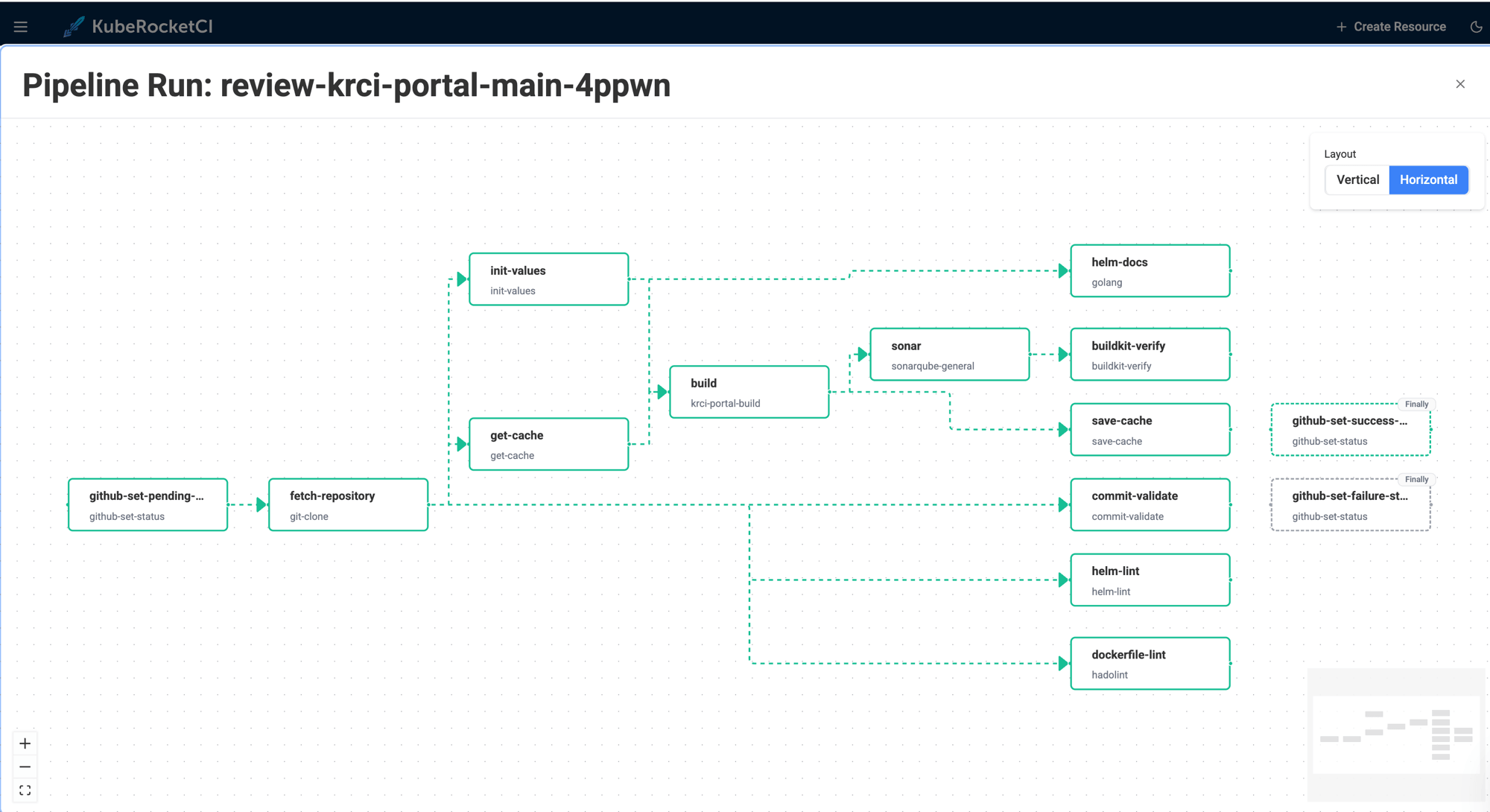
Live logs and history. The PipelineRun details page streams live container logs while a run is active. After completion, logs are served from Tekton Results - the same view, no separate log aggregation setup needed.
Inline manual approval. When a pipeline step is an ApprovalTask (a platform-native CRD), the portal renders Approve / Reject buttons directly in the task view - with an optional comment field. The approval decision (spec.action, spec.approve.approvedBy, spec.approve.comment) is written back to the ApprovalTask resource. This is how release gates and environment promotion approvals are implemented as Kubernetes-native objects.
Getting Started
Step 1 - Install the platform
Follow the Quick Start: Install KubeRocketCI guide for a local cluster. For production on AWS, see Deploy on AWS EKS.
Step 2 - Install Tekton components
The Install Tekton guide covers both vanilla Kubernetes and OKD/OpenShift (Tekton Operator). For the fully automated path, see Add-Ons Overview.
Step 3 - Connect your Git provider
Walk through Integrate GitHub or configure GitLab/Bitbucket in the portal under Git Servers.
Step 4 - Integrate container registry and code quality
Integrate DockerHub wires up image push. Integrate SonarQube activates the quality gate step in the build pipeline.
Step 5 - Onboard your first application
Create Application registers your codebase. The platform provisions a review and build pipeline for the default branch automatically - the Helm-templated library selects the correct pipeline name based on your tech stack.
Step 6 - Configure a deployment environment
Deploy Application connects Argo CD and configures the first CD pipeline stage. Integrate Argo CD covers the Argo CD setup.
From a fresh cluster to a working build-and-deploy loop typically takes a few hours.
What Every Onboarded App Gets Automatically
Once the platform is running, every onboarded application has:
- A review pipeline on every pull request - compile, test, SonarQube quality gate.
- A build pipeline on every merge - versioned artifact, container image pushed, Tekton Chains provenance attestation.
- A CD pipeline connected to Argo CD - promoting artifacts through configured stages.
- Pipeline definitions in Git - every change to a pipeline goes through code review, synchronized by Argo CD.
- Live + archived logs - streaming during a run, served from Tekton Results after completion.
- Manual approval gates - inline approve/reject in the portal for any pipeline step that requires human sign-off.
This is what our own dogfooding instance looks like - we run KubeRocketCI on KubeRocketCI itself. Over 90 days, the krci namespace logged 18,397 pipeline runs (~200/day across build, review, and deploy types), with build pipelines hitting a 93% success rate at an average duration of 14 minutes 38 seconds. No external CI server involved.
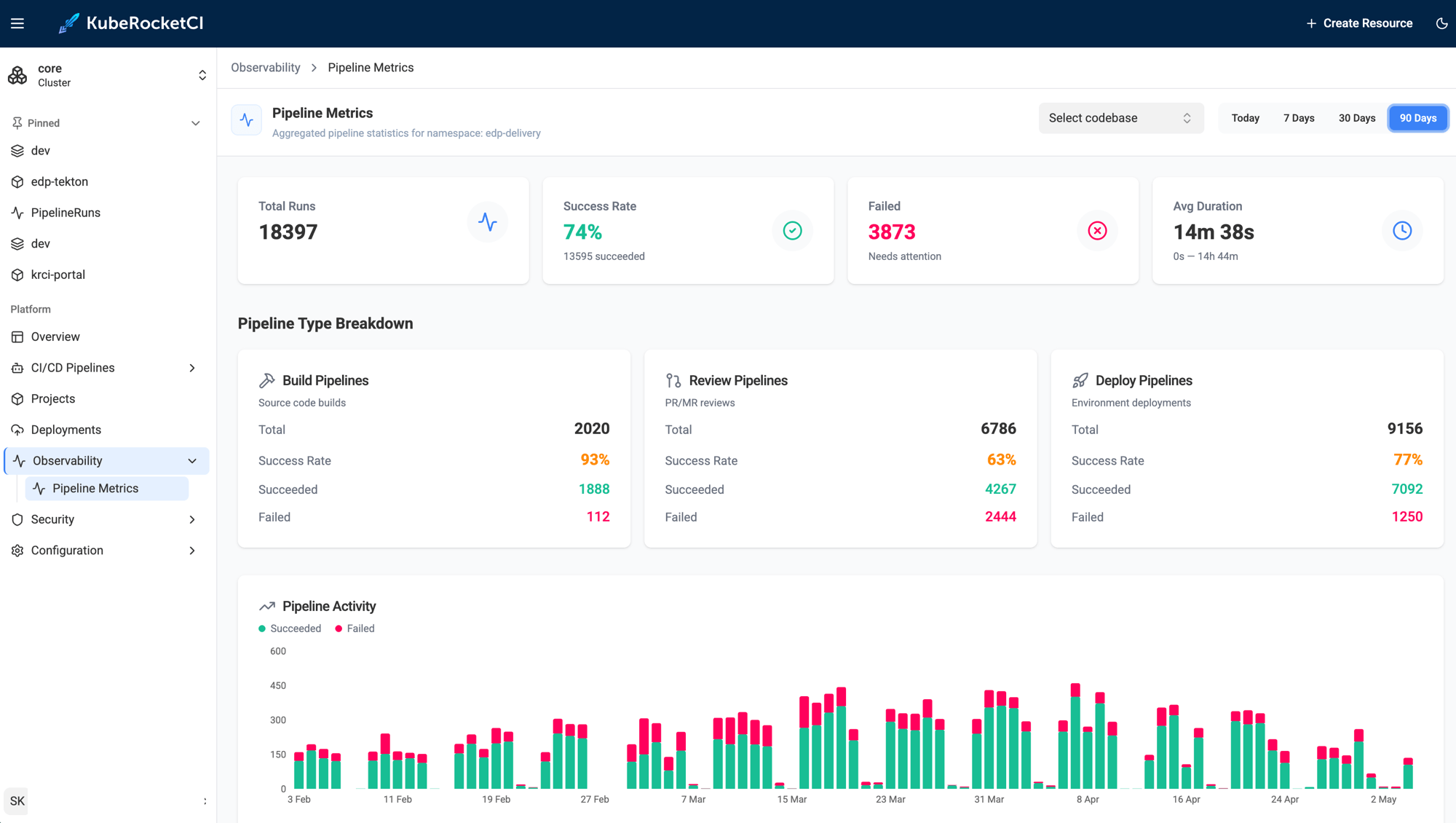
The entire path - review pipeline on PR open, build pipeline on merge, artifact versioning, image push, and Argo CD sync - runs without the developer writing a single line of Jenkins Groovy or pipeline YAML. The only required input is declaring the tech stack at onboarding time.
No manual wiring required. The opinionated defaults deliver a production-grade setup from day one, and the full Tekton API surface is available when you need to diverge.
Next Steps
- Explore the Tekton Overview for the complete pipeline type and trigger reference.
- Try the application scaffolding use case to see the platform generate a project skeleton with a working CI/CD pipeline in minutes.
- Follow autotest as quality gate to promote automatically only when integration tests pass.
- Read deploy application from a feature branch for ephemeral environment patterns.
KubeRocketCI is open-source under Apache License 2.0. Platform source, Helm charts, and the full Tekton pipeline library are on GitHub.