PipelineRun History and Logs Are Missing
This troubleshooting page covers the problems with the history of PipelineRuns, the logs of completed runs, and the pipeline metrics in the KubeRocketCI portal.
Problem
The portal shows only the PipelineRuns that still exist in the cluster, or it shows one of the following messages:
-
Under the list of PipelineRuns, the portal shows
Older runs didn't loadand the Retry button: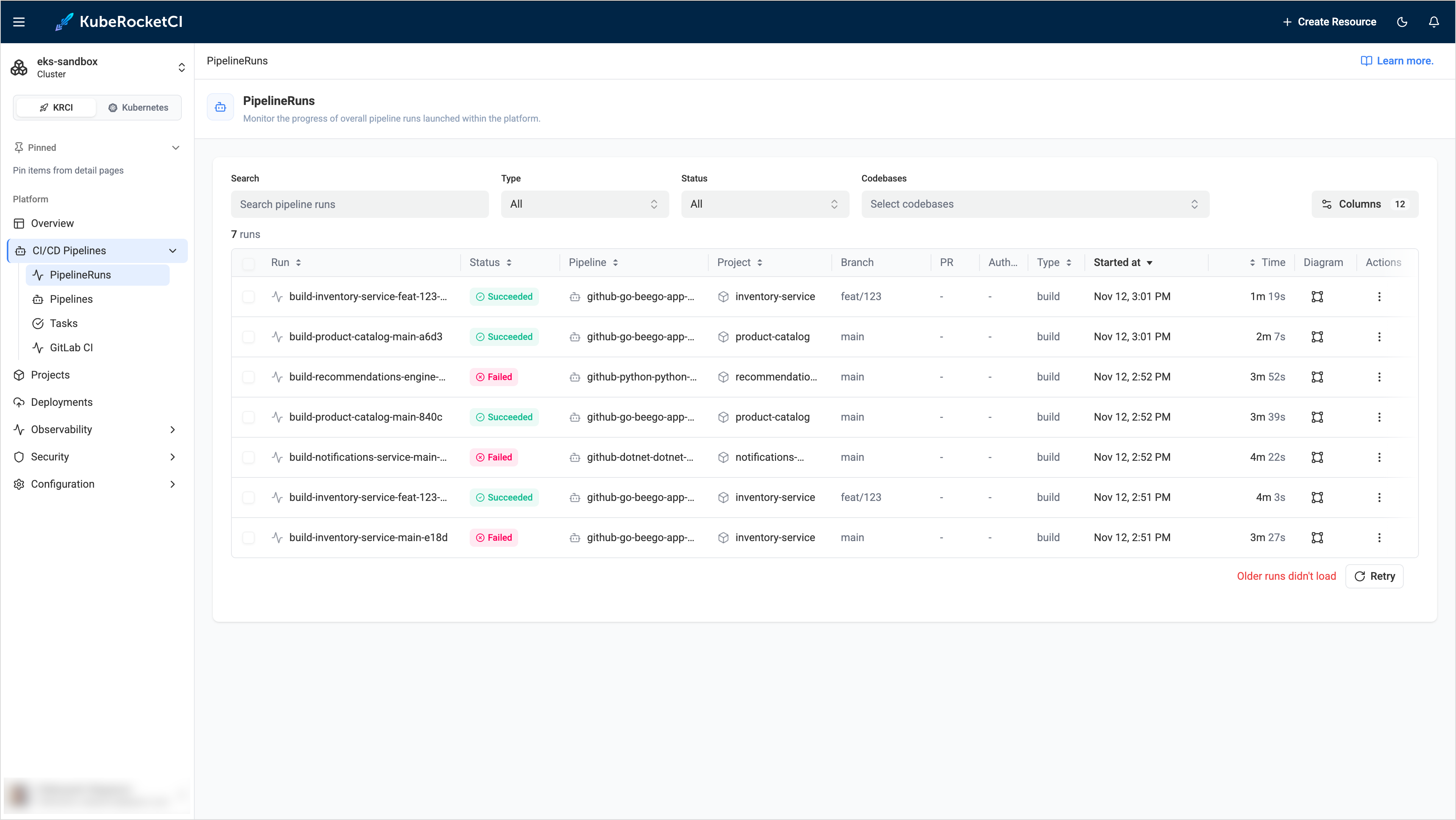
-
In the logs of a completed PipelineRun, the portal shows
Archiving in progress — logs will appear shortly...and then, after one minute,Logs may not be availablewith the descriptionThe pipeline has completed, but logs were not archived. Pod logs may have been garbage-collected. -
The Pipeline Metrics page shows
Failed to load metrics. -
The PipelineRun list shows no history for a namespace other than the default one.
Cause
The portal keeps no history of its own. It shows the PipelineRuns that exist in the cluster, and it reads the completed runs, their logs, and the metrics from the Tekton Results API. The following table lists the causes and how they look in the portal log:
| Message in the portal log or error | Cause |
|---|---|
[Tekton Results] Status: 401 | The API requires a token, and the portal sent none or an invalid one. |
[Tekton Results] Status: 403 | The API accepted the token, but the portal ServiceAccount has no access to the Tekton Results of the namespace. |
[Tekton Results] Status: 400 and Client sent an HTTP request to an HTTPS server | The TEKTON_RESULTS_URL parameter starts with http://, but the API works over TLS. |
TEKTON_RESULTS_URL is not an https:// URL: the ServiceAccount token is not sent | The portal sends its token only over HTTPS. |
No ServiceAccount token mounted: requests are sent unauthenticated | The portal Pod has no ServiceAccount token because serviceAccount.automount is false. |
Tekton Results is unreachable | The portal cannot connect to the API, for example, because of DNS, a network policy, or a certificate that the portal does not trust. |
TEKTON_RESULTS_URL environment variable is not configured | The parameter is empty. See Feature Is Not Configured. |
Other situations are not errors:
- A run is not archived yet. A PipelineRun is stored in Tekton Results shortly after it completes. If the Tekton Results watcher does not work or lags, the logs stay unavailable. If the Pod of the run is already deleted, the logs are lost.
- History covers only the default namespace. The portal reads Tekton Results of the default namespace only. If you filter the list by another namespace, only the live runs are shown.
- An archived run cannot be selected. The rows of the history have the
PipelineRun is archivedtooltip and are not selectable, because the run no longer exists in the cluster.
Solution
-
Read the reason in the portal log:
kubectl -n <krci-namespace> logs deploy/krci-portal | grep "Tekton Results" -
Check the address and the portal values:
kubectl -n <krci-namespace> get configmap portal-config -o yaml | grep TEKTON_RESULTS_URLSince KubeRocketCI 3.16.1, the Tekton Results API works over
https://with authentication. The portal needs thehttps://address, the CA certificate of the API, and the read access of its ServiceAccount. Set the values as described in Configure the Portal for the Tekton Results API:values.yamlkrci-portal:configEnv:TEKTON_RESULTS_URL: https://tekton-results-api-service.tekton-pipelines.svc:8080tektonResults:rbac:enabled: truecaCert: |-----BEGIN CERTIFICATE-----<contents of ca.crt>-----END CERTIFICATE-----noteIf you did not enable the authentication and TLS for Tekton Results, the API still works over plain HTTP without a token. In this case, the
http://address is correct, the portal shows the history, and the warning about the missinghttps://address in the log is harmless.To check which mode the API uses, send a request from the portal Pod. The command sends no token:
kubectl -n <krci-namespace> exec deploy/krci-portal -- node -e 'fetch(process.env.TEKTON_RESULTS_URL + "/apis/results.tekton.dev/v1alpha2/parents/<namespace>/results?page_size=10", { signal: AbortSignal.timeout(10000) }).then(async r => console.log(r.status, (await r.text()).slice(0, 200))).catch(e => console.log("ERROR:", e.cause?.code || e.message))'The
200status means that the API needs no token. The401or403status means that the API requires authentication, so the portal needs thehttps://address and the values above. The400status with theClient sent an HTTP request to an HTTPS servermessage means that the API works over TLS, so use thehttps://address. -
If the API is unreachable, check that the Tekton Results Pods are running, and that the address from step 2 resolves from the portal namespace:
kubectl -n tekton-pipelines get pods | grep tekton-resultskubectl -n tekton-pipelines get svc tekton-results-api-service -
If the logs of new runs never appear, check that the watcher archives them. Read the log of the watcher Pod from the output of the previous step, for example:
kubectl -n tekton-pipelines logs <tekton-results-watcher-pod> --tail=100 -
After you change a Helm value, the portal Pod restarts by itself. Open the PipelineRuns page again, or click Retry under the list.