Pipelines Overview
Pipelines are an integral part of any CI/CD. They are involved in code build, review, and deployment procedures. Such a big variety of pipelines results in a demand for having a single place where the pipelines can be managed. For this purpose, the Pipelines section was added to the KubeRocketCI portal.
Pipelines Page Overview
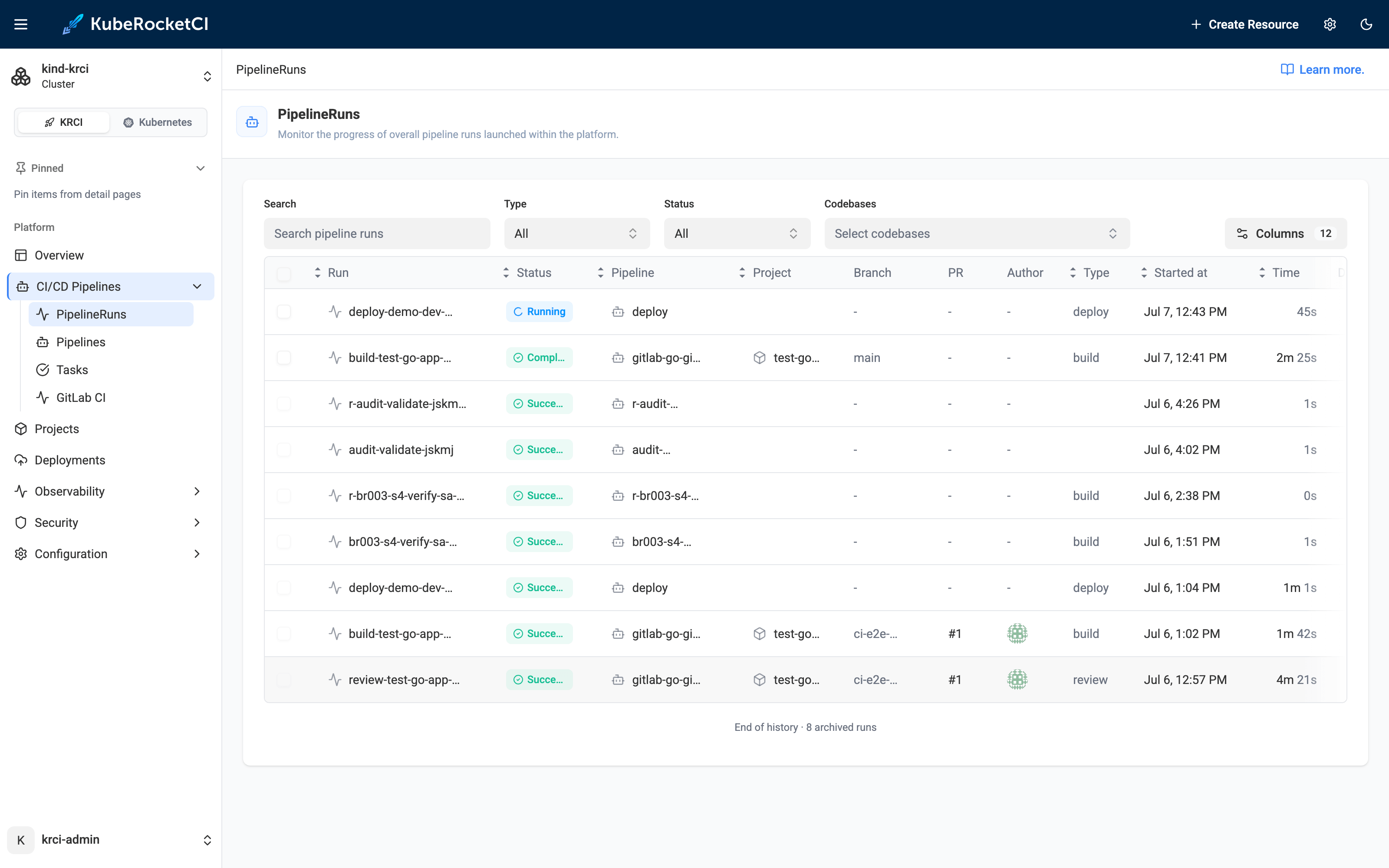
To see the CI/CD Pipelines section, open the KubeRocketCI portal and select the CI/CD Pipelines section:
- PipelineRuns - Shows the recent PipelineRuns. You can search PipelineRuns and filter them by status, type, and Codebase they launched for;
- Pipelines - This tab lists all the Tekton Pipelines created in the platform. Users with administrator rights can also edit them;
- Tasks - This tab lists all the Tekton Tasks created in the platform. Users with administrator rights can also edit them.
Pipeline Overview
To inspect pipeline details, click the PipelineRun name:
- The Details tab displays the PipelineRun status and logs;
- The View YAML tab displays the YAML configuration of your pipeline. It also allows to view the general information and resources that the pipeline is connected with;
- The Diagram tab displays the pipeline's real-time status. Click the task name to navigate to the corresponding task in the Details tab;
- The Results tab shows the resulting artifact that was built in the pipeline. Note that this tab is accessible only in Build Pipelines that produce artifacts.
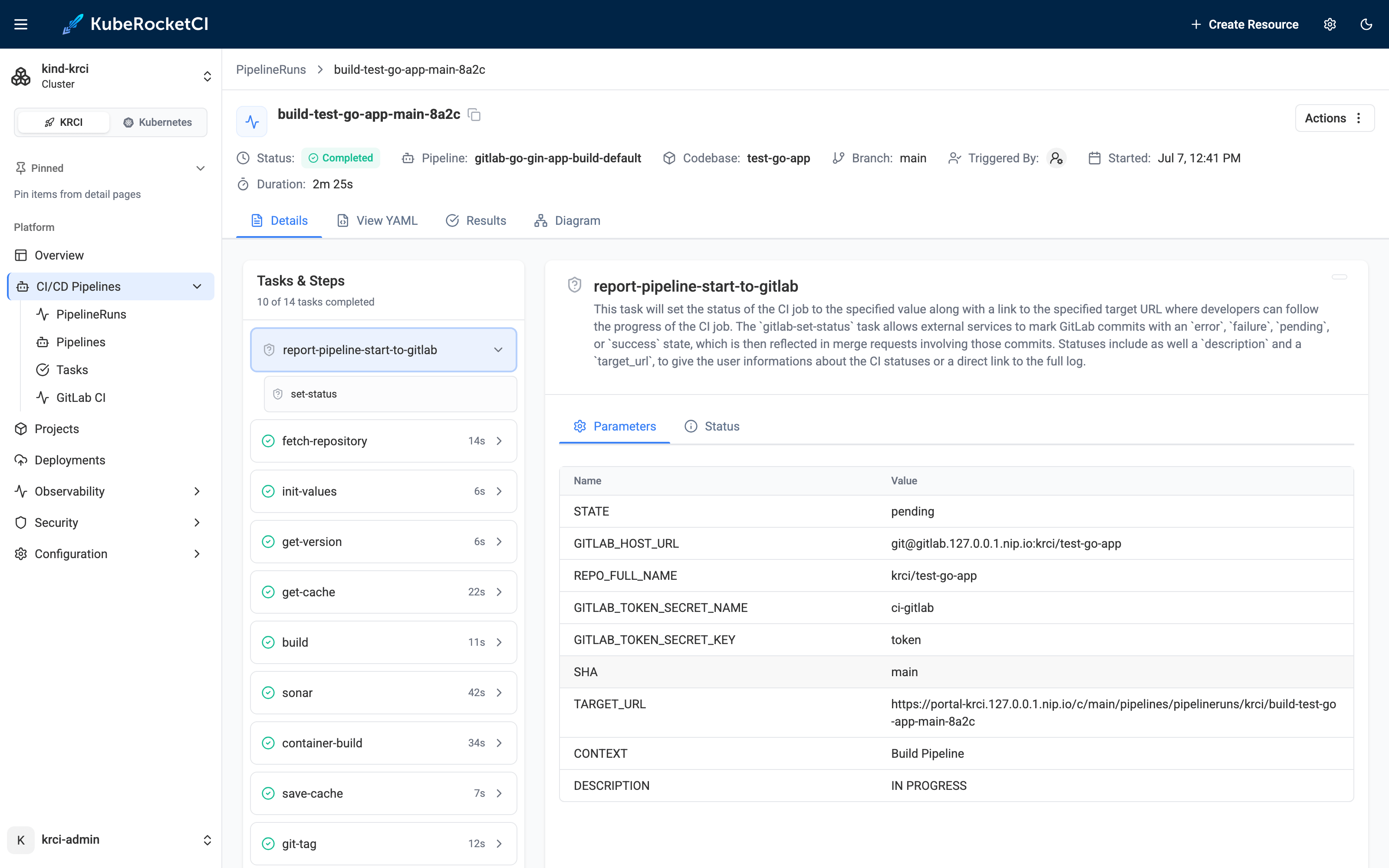
The PipelineRun header also shows the Triggered By field — the identity that started the run. For runs launched by automation (for example, a Git webhook or a scheduled build) this is the service account that created the run; for runs started from the portal it is the corresponding user. The field is resolved from the platform audit trail and is distinct from the Author field, which shows the Git commit author. When the initiator cannot be resolved — for example, historical runs created before audit capture was enabled — the field shows N/A.
You can also view the build pipeline results from the codebase details page and the Pipelines section.
Operate With Pipelines
The Pipelines section allows you to track, restart, stop, and delete pipelines.
To restart the PipelineRun, click the actions button and select Run again.
To restart the PipelineRun using different parameters, click the actions button and select Run with params.
To delete the PipelineRun, click the actions button and select Delete. Deleting PipelineRuns requires administrator rights.
Alternatively, you can enter the PipelineRun and delete/restart the pipeline using the corresponding buttons.
There is also an option to store the long-term logs using the OpenSearch tool. You can install OpenSearch using our cluster add-ons repository.
Inspect via CLI
The same PipelineRuns can be listed and inspected from a terminal with the krci CLI:
krci pipelinerun list --project <project> --status=failed
krci pipelinerun get <pipelinerun-name> --reason
--reason on pipelinerun get returns the task tree and failure diagnosis directly, without opening the Details or Diagram tab. Add -o json to either command to feed the result into a script or an AI agent.
Edit Pipelines/Tasks
KubeRocketCI portal allows to edit the existing Tekton Pipelines and Tasks directly in the Pipelines section. In our example, we will show how to edit a Task but the same procedure applies to Pipelines:
Starting with KubeRocketCI 3.16, only members of the ${platform}-oidc-admins group can edit Pipelines and Tasks; for other users the Edit action is unavailable. Pipelines and Tasks are platform configuration: change them in the Git repository that delivers them to the cluster, so that every change is reviewed and tracked (see Create and Use Custom Tekton Pipelines). If a Pipeline or Task is managed by Helm or Argo CD, a direct edit is reverted on the next upgrade or sync. For details, see Tekton Pipeline Permissions.
-
Navigate to the Tasks tab.
-
Enter a Task by clicking its name.
-
On the Task details page, in the top right corner of the screen, click Edit.
-
On the edit window, make your changes and click Saved.
Now you know how to view and manage pipelines in KubeRocketCI.