How Does KubeRocketCI Determine the Default Namespace on First Login?
On the very first login to the platform, KubeRocketCI will attempt to automatically define both default and allowed namespace. The platform follows a specific priority order to determine which namespace to use.
1. Deployment Namespace
When installing KubeRocketCI, the platform writes the target namespace into the DEFAULT_NAMESPACE parameter of the portal deployment:
- name: DEFAULT_NAMESPACE
  valueFrom:
    fieldRef:
      apiVersion: v1
      fieldPath: metadata.namespace
This is the first place the platform checks the namespace to pre-populate it in the KubeRocketCI portal.
2. Keycloak Configuration
If the DEFAULT_NAMESPACE parameter is empty for some reason, the platform will try to get the default namespace from the Keycloak attribute.
If Keycloak is configured and integrated to the platform, the KubeRocketCI portal receives a Keycloak token that contains the namespace specified in the default_namespace attribute:
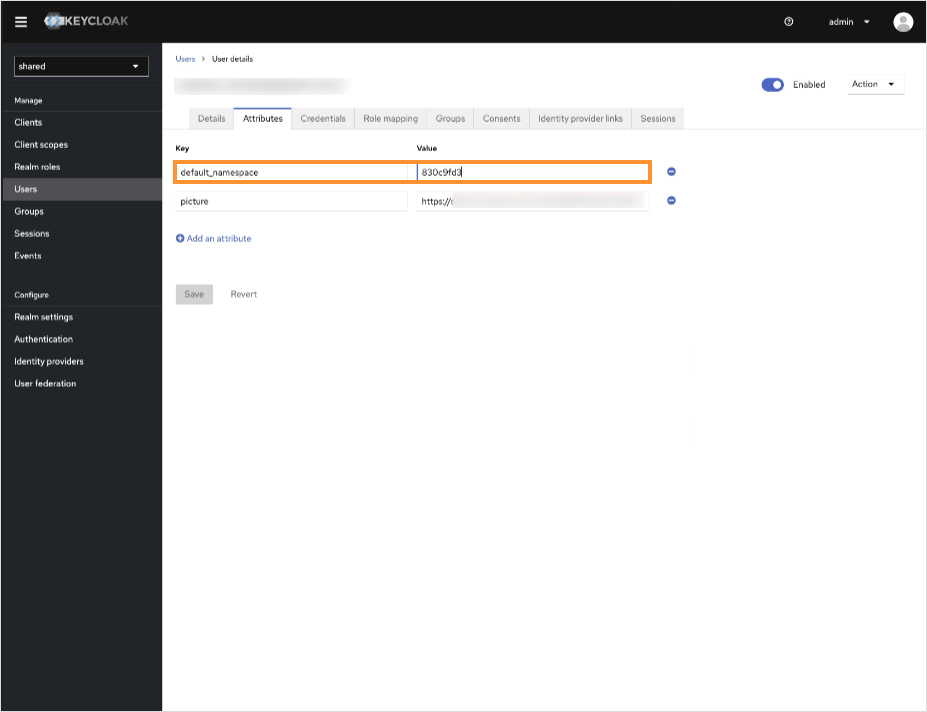
When the DEFAULT_NAMESPACE parameter is not empty, you are expected to see the namespace in this user attribute. Redefining the Keycloak user attribute doesn't overwrite the default namespace in the portal. This method works only if the DEFAULT_NAMESPACE parameter is not defined from the beginning.
3. Manual Setting
If both deployment and Keycloak configuration are empty or missing, there will be no namespace specified in the portal. The only available option left is to set namespaces manually. Refer to the Portal Settings page for more details on cluster settings.