External Secrets Operator Integration
External Secrets Operator (ESO) can be integrated with KubeRocketCI.
There are multiple Secrets Providers that can be used within ESO. On this page, we detail the integration of KubeRocketCI with the two foremost providers:
KubeRocketCI leverages a variety of secrets to facilitate the integration of different solutions. This document provides a comprehensive overview of the secrets utilized within the KubeRocketCI platform, along with their respective descriptions. Please note that all secrets are encoded in Base64 format.
| Secret Name | Fields | Description | Used by |
|---|---|---|---|
| keycloak | username password | Username and password with specific permissions for the Platform tenant management in Keycloak | keycloak-operator |
| ci-defectdojo | token url | DefectDojo token DefectDojo URL | edp-tekton |
| kaniko-docker-config | .dockerconfigjson | Serialized JSON that follows docker config patterns | edp-tekton |
| regcred | .dockerconfigjson | Serialized JSON that follows docker config patterns | cd-pipeline-operator |
| ci-github | id_rsa token secretString | Private key from github repo API token Random string | edp-tekton |
| ci-gitlab | id_rsa token secretString | Private key from gitlab repo API token Random string | edp-tekton |
| ci-bitbucket | id_rsa token secretString | Private key from bitbucket repo API token Random string | edp-tekton |
| ci-jira | username password | Jira username Jira password | edp-codebase-operator |
| ci-sonarqube | token url | SonarQube token SonarQube URL | edp-tekton |
| ci-nexus | username password url | Nexus username Nexus password Nexus URL | edp-tekton |
| ci-dependency-track | token url | Dependency-Track token Dependency-Track URL | edp-tekton |
| oauth2-proxy-cookie-secret | cookie-secret | Secret key for oauth2-proxy | edp-install |
| keycloak-client-headlamp-secret | clientSecret | Secret key for keycloak client | keycloak-operator |
| ci-argocd | token url | Argo CD token Argo CD URL | edp-tekton |
Platform Core Secrets
The list below represents the baseline required for full operation within platform core components:
- kaniko-docker-config: Used for pushing container images to a specific registry.
- ci-sonarqube: Used in the CI process for SonarQube integration.
- ci-nexus: Used for pushing artifacts to the Nexus storage.
These secrets are mandatory for Tekton pipelines to work properly.
Kubernetes Provider
All secrets are stored in Kubernetes in pre-defined namespaces. Platform suggests using the following approach for secrets management:
-
KRCI_NAMESPACE-vault, whereKRCI_NAMESPACEis a name of the namespace where KubeRocketCI is deployed, such askrci-vault. This namespace is used by the platform. Access to secrets in thekrci-vaultis granted only forAdministrators. -
KRCI_NAMESPACE-cicd-vault, whereKRCI_NAMESPACEis a name of the namespace where KubeRocketCI is deployed, such askrci-cicd-vault. Development team uses secrets in thekrci-cicd-vaultfor microservices development.
See a diagram below for more details:
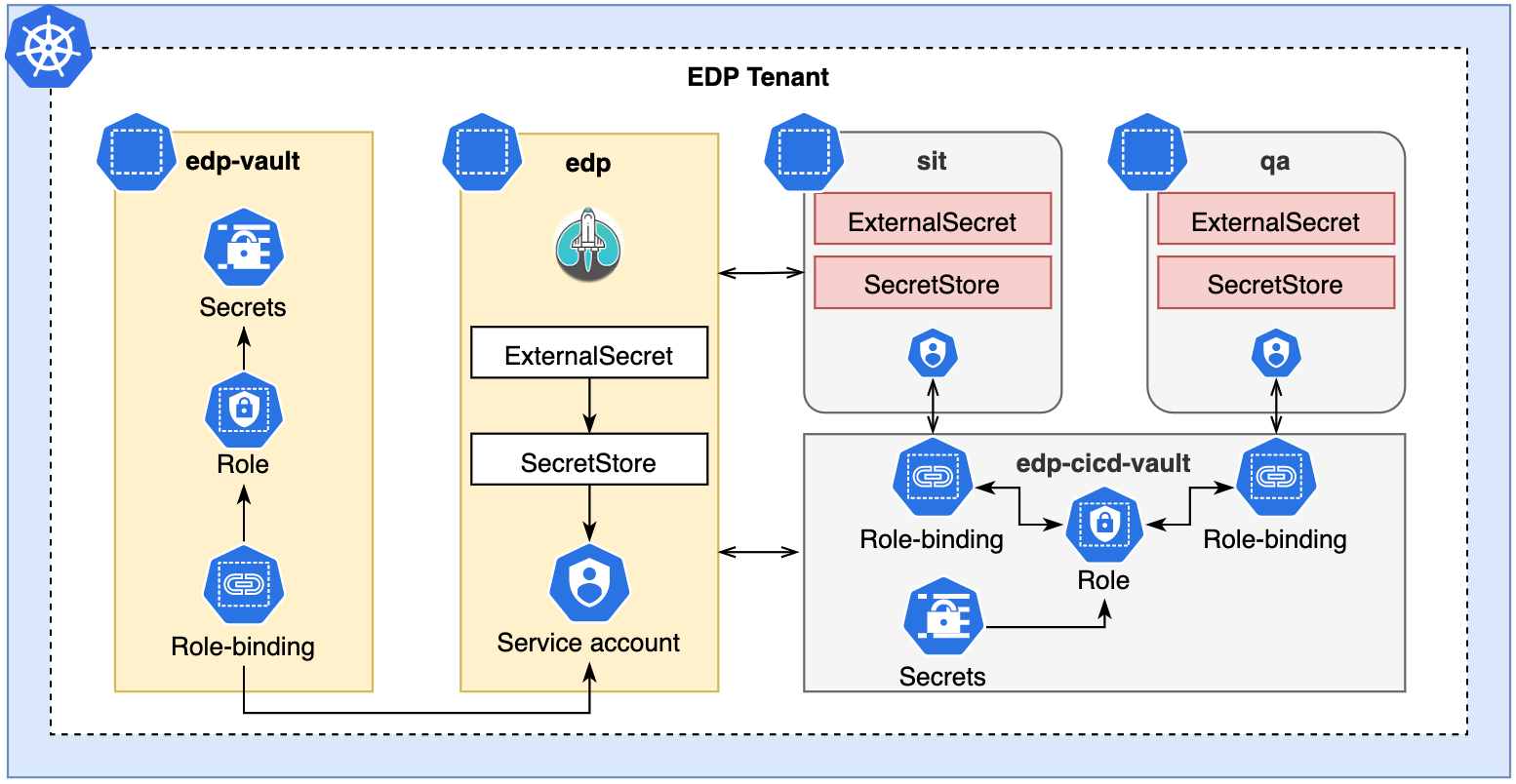
In order to Install KubeRocketCI, a list of passwords must be created. Secrets are provided automatically when using ESO.
-
Create a common namespace for secrets and platform:
kubectl create namespace krci-vaultkubectl create namespace krci -
Create secrets in the
krci-vaultnamespace:apiVersion: v1kind: Secretmetadata:name: keycloaknamespace: krci-vaultdata:password: cGFzcw== # pass in base64username: dXNlcg== # user in base64type: Opaque -
In the
krci-vaultnamespace, create a Role with a permission to read secrets:apiVersion: rbac.authorization.k8s.io/v1kind: Rolemetadata:namespace: krci-vaultname: external-secret-storerules:- apiGroups: [""]resources:- secretsverbs:- get- list- watch- apiGroups:- authorization.k8s.ioresources:- selfsubjectrulesreviewsverbs:- create -
In the
krci-vaultnamespace, create a ServiceAccount used bySecretStore:apiVersion: v1kind: ServiceAccountmetadata:name: secret-managernamespace: krci -
Connect the Role from the
krci-vaultnamespace with the ServiceAccount in thekrcinamespace:apiVersion: rbac.authorization.k8s.io/v1kind: RoleBindingmetadata:name: eso-from-krcinamespace: krci-vaultsubjects:- kind: ServiceAccountname: secret-managernamespace: krciroleRef:apiGroup: rbac.authorization.k8s.iokind: Rolename: external-secret-store -
Create a SecretStore in the
krcinamespace, and use ServiceAccount for authentication:apiVersion: external-secrets.io/v1beta1kind: SecretStoremetadata:name: krci-vaultnamespace: krcispec:provider:kubernetes:remoteNamespace: krci-vault # namespace with secretsauth:serviceAccount:name: secret-managerserver:caProvider:type: ConfigMapname: kube-root-ca.crtkey: ca.crt -
Each secret must be defined by the
ExternalSecretobject. A code example below creates thekeycloaksecret in thekrcinamespace based on a secret with the same name in thekrci-vaultnamespace:apiVersion: external-secrets.io/v1beta1kind: ExternalSecretmetadata:name: keycloaknamespace: krcispec:refreshInterval: 1hsecretStoreRef:kind: SecretStorename: krci-vault# target:# name: secret-to-be-created # name of the k8s Secret to be created. metadata.name used if not defineddata:- secretKey: username # key to be createdremoteRef:key: keycloak # remote secret nameproperty: username # value will be fetched from this field- secretKey: password # key to be createdremoteRef:key: keycloak # remote secret nameproperty: password # value will be fetched from this field
Apply the same approach for enabling secrets management in the namespaces used for microservices development, such as sit and qa on the diagram above.
AWS Systems Manager Parameter Store
AWS SSM Parameter Store can be used as a Secret Provider for ESO. For the platform, it is recommended to use the IAM Roles For Service Accounts approach (see a diagram below).
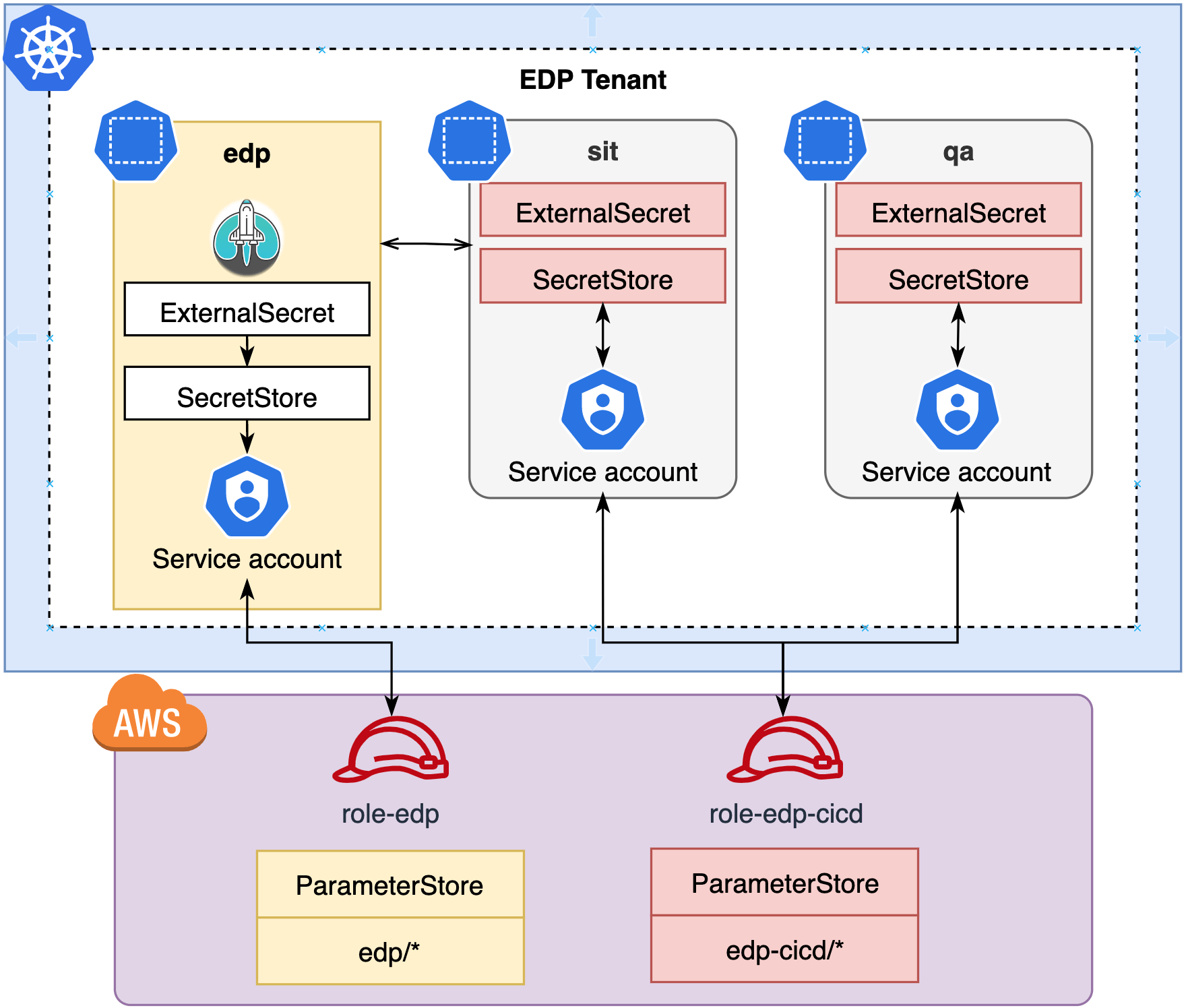
AWS Parameter Store Scenario in KubeRocketCI
In order to Install KubeRocketCI, a list of passwords must be created. Follow the steps below, to get secrets from the SSM:
-
In the AWS, create an AWS IAM policy and an IAM role used by
ServiceAccountinSecretStore. The IAM role must have permissions to get values from the SSM Parameter Store.a. Create an IAM policy that allows to get values from the Parameter Store with the
krci/path. Use yourAWS RegionandAWS Account Id:{"Version": "2012-10-17","Statement": [{"Sid": "VisualEditor0","Effect": "Allow","Action": "ssm:GetParameter*","Resource": "arn:aws:ssm:eu-central-1:012345678910:parameter/krci/*"}]}b. Create an AWS IAM role with trust relationships (defined below) and attach the IAM policy. Put your string for
Federatedvalue (see more on IRSA enablement for EKS Cluster) and AWS region.{"Version": "2012-10-17","Statement": [{"Effect": "Allow","Principal": {"Federated": "arn:aws:iam::012345678910:oidc-provider/oidc.eks.eu-central-1.amazonaws.com/id/XXXXXXXXXXXXXXXXXX"},"Action": "sts:AssumeRoleWithWebIdentity","Condition": {"StringLike": {"oidc.eks.eu-central-1.amazonaws.com/id/XXXXXXXXXXXXXXXXXX:sub": "system:serviceaccount:krci:*"}}}]} -
Create a secret in the AWS Parameter Store with the name
/krci/my-json-secret. This secret is represented as a parameter of type string within the AWS Parameter Store:View: Parameter Store JSON
{"keycloak":{"username": "keycloak-username","password": "keycloak-password"},"ci-defectdojo":{"token": "XXXXXXXXXXXX","url": "https://defectdojo.example.com"},"kaniko-docker-config":{"auths" :{"registry.com":{"username":"registry-username","password":"registry-password","auth": "<base64 encoded 'user:secret' string>"}}},"regcred":{"auths":{"registry.com":{"username":"registry-username","password":"registry-password","auth":"<base64 encoded 'user:secret' string>"}}},"ci-github":{"id_rsa": "id-rsa-key","token": "github-token","secretString": "XXXXXXXXXXXX"},"ci-gitlab":{"id_rsa": "id-rsa-key","token": "gitlab-token","secretString": "XXXXXXXXXXXX"},"ci-jira":{"username": "jira-username","password": "jira-password"},"ci-sonarqube":{"username": "<ci-user>","secret": "<secret>"},"ci-nexus":{"username": "<ci.user>","password": "<secret>"},"oauth2-proxy-cookie-secret":{"cookie-secret": "XXXXXXXXXXXX"},"keycloak-client-headlamp-secret": "XXXXXXXXXXXX","ci-argocd":{"token": "argocd-token","url": "https://argocd.example.com"},"ci-dependency-track":{"token": "dependency-track-token","url": "https://dependency-track.example.com"}} -
Set External Secret operator enabled by updating the values.yaml file:
external-secrets:createNamespace: falseenable: falsenamespace: external-secrets -
Install/upgrade edp-install:
helm upgrade --install krci epamedp/edp-install --wait --timeout=900s \--version <edp_version> \--values values.yaml \--namespace krci \--atomic