Upgrade KubeRocketCI v3.11 to 3.12
This section provides detailed instructions for upgrading KubeRocketCI to version 3.12. Follow the steps and requirements outlined below:
We suggest backing up the KubeRocketCI environment before starting the upgrade procedure.
-
(Optional) Update Tekton Custom Pipelines
noteFor more information about using Tekton custom pipelines in KubeRocketCI, refer to the Create and Use Custom Tekton Pipelines use case.
In case of using Tekton custom pipelines, it is necessary to update them to ensure compatibility with the new version of KubeRocketCI.
-
Branch Name Validation Update
Starting from version 3.12, the KubeRocketCI portal supports adding branches with long names (more than 30 characters), including support for special characters and uppercase letters. Due to this change, it is necessary to update the passing parameters for the
update-cbistask in the Tekton custom build pipelines to ensure compatibility with the new version of KubeRocketCI.The
update-cbisTekton task now accepts theCODEBASEBRANCH_NAMEparameter instead ofCBIS_NAME. Update theupdate-cbispassing parameters in the Tekton custom build pipelines as follows:- 3.11
- 3.12
PipelineapiVersion: tekton.dev/v1
kind: Pipeline
metadata:
labels:
app.edp.epam.com/pipelinetype: build
app.edp.epam.com/triggertemplate: github-build-template
name: custom-build-pipeline
spec:
...
tasks:
- name: update-cbis
params:
- name: CBIS_NAME
value: $(tasks.init-values.results.RESULT_IMAGE_NAME)
- name: IMAGE_TAG
value: $(tasks.get-version.results.IS_TAG)
runAfter:
- git-tag
taskRef:
kind: Task
name: update-cbisPipelineapiVersion: tekton.dev/v1
kind: Pipeline
metadata:
labels:
app.edp.epam.com/pipelinetype: build
app.edp.epam.com/triggertemplate: github-build-template
name: custom-build-pipeline
spec:
...
tasks:
- name: update-cbis
params:
- name: CODEBASEBRANCH_NAME
value: $(params.CODEBASEBRANCH_NAME)
- name: IMAGE_TAG
value: $(tasks.get-version.results.IS_TAG)
runAfter:
- git-tag
taskRef:
kind: Task
name: update-cbisUpdated
update-cbistask in the KubeRocketCI version 3.12 is provided below for reference:update-cbis
Updated
update-cbistask in KubeRocketCI version 3.12:apiVersion: tekton.dev/v1
kind: Task
metadata:
name: update-cbis
spec:
description: >-
This task updates a Codebase ImageStream (CBIS) with a new image tag. It checks for the presence of tags in the specified CBIS and adds the new tag if it doesn't already exist.
The task utilizes kubectl commands and is customizable with parameters for CBIS
params:
- name: CODEBASEBRANCH_NAME
type: string
description: "CodebaseBranch name with only letters and dashes"
- name: IMAGE_TAG
type: string
- name: BASE_IMAGE
description: The base image for the task.
type: string
default: {{ include "edp-tekton.registry" . }}/bitnami/kubectl:1.25.4
steps:
- name: update-cbis
image: $(params.BASE_IMAGE)
env:
- name: CODEBASEBRANCH_NAME
value: "$(params.CODEBASEBRANCH_NAME)"
- name: IMAGE_TAG
value: "$(params.IMAGE_TAG)"
script: |
#!/usr/bin/env bash
set -e
cbisName=$(kubectl get cbis.v2.edp.epam.com -l app.edp.epam.com/codebasebranch="${CODEBASEBRANCH_NAME}" -o jsonpath='{.items[0].metadata.name}')
if [ -z "${cbisName}" ]; then
echo "[TEKTON][ERROR] No CBIS found with label app.edp.epam.com/codebasebranch=${CODEBASEBRANCH_NAME}"
exit 1
fi
cbisCrTags=$(kubectl get cbis.v2.edp.epam.com ${cbisName} --output=jsonpath={.spec.tags})
dateFormat=$(date -u '+%Y-%m-%dT%H:%M:%SZ')
newcbisTag="{\"name\":\"${IMAGE_TAG}\",\"created\":\"${dateFormat}\"}"
if [ "${cbisCrTags}" = "" ] ; then
echo "[TEKTON][DEBUG] There're no tags in imageStream ${cbisName} ... the first one will be added."
kubectl patch cbis.v2.edp.epam.com ${cbisName} --type=merge -p "{\"spec\":{\"tags\":[${newcbisTag}]}}"
fi
cbisTagsList=$(kubectl get cbis.v2.edp.epam.com ${cbisName} --output=jsonpath={.spec.tags[*].name})
if [[ ! ${cbisTagsList} == *"${IMAGE_TAG}"* ]]; then
echo "[TEKTON][DEBUG] ImageStream ${cbisName} doesn't contain ${IMAGE_TAG} tag ... it will be added."
kubectl patch cbis.v2.edp.epam.com ${cbisName} --type json -p="[{\"op\": \"add\", \"path\": \"/spec/tags/-\", \"value\": ${newcbisTag} }]"
fi -
Build Pipeline Task Condition Update
noteThis change is relevant only for build pipelines with
semverversioning type.In version 3.12, the execution condition for the
update-cbbTekton task has been updated to ensure that theSuccessful buildfield for the Component branch is properly updated in the KubeRocketCI portal. Now, theupdate-cbbtask will also be executed if build pipelines are triggered manually and have theCompletedstatus.Update the
update-cbbtask condition in the Tekton custom build pipelines as follows:- 3.11
- 3.12
PipelineapiVersion: tekton.dev/v1
kind: Pipeline
metadata:
labels:
app.edp.epam.com/pipelinetype: build
app.edp.epam.com/triggertemplate: github-build-template
name: custom-build-semver
spec:
...
finally:
- name: update-cbb
params:
- name: CODEBASEBRANCH_NAME
value: $(params.CODEBASEBRANCH_NAME)
- name: CURRENT_BUILD_NUMBER
value: $(tasks.get-version.results.BUILD_ID)
taskRef:
kind: Task
name: update-cbb
when:
- input: $(tasks.status)
operator: in
values:
- SucceededPipelineapiVersion: tekton.dev/v1
kind: Pipeline
metadata:
labels:
app.edp.epam.com/pipelinetype: build
app.edp.epam.com/triggertemplate: github-build-template
name: custom-build-semver
spec:
...
finally:
- name: update-cbb
params:
- name: CODEBASEBRANCH_NAME
value: $(params.CODEBASEBRANCH_NAME)
- name: CURRENT_BUILD_NUMBER
value: $(tasks.get-version.results.BUILD_ID)
taskRef:
kind: Task
name: update-cbb
when:
- input: $(tasks.status)
operator: in
values:
- Succeeded
- Completed -
Deploy Pipeline Parameters Renaming
noteFor detailed information about parameter changes in Tekton tasks, refer to the edp-tekton repository.
In version 3.12, the deprecated parameters
PIPELINEandSTAGEwere renamed in the Tekton tasks used in deployment pipelines to align with the KubeRocketCI portal naming conventions. Due to this change, it is necessary to update the passing parameters for the custom deploy pipelines that use the following Tekton tasks such asinit-autotests,clean,deploy-ansible-awx,deploy-ansible,deploy-applicationset-cli,run-quality-gate,run-clean-gate,sync-app, andpromote-images.For tasks such as
run-clean-gate,clean,run-quality-gate,deploy-ansible-awx,deploy-ansible,sync-app, anddeploy-applicationset-cli, it is necessary to rename the passing parameters fromPIPELINEtoDEPLOYMENT_FLOWand fromSTAGEtoENVIRONMENTin the Tekton custom deploy pipelines as follows:- 3.11
- 3.12
PipelineapiVersion: tekton.dev/v1
kind: Pipeline
metadata:
labels:
app.edp.epam.com/pipelinetype: deploy
app.edp.epam.com/triggertemplate: deploy
name: custom-deploy-pipeline
spec:
...
tasks:
- name: deploy-app
params:
- name: PIPELINE
value: $(params.CDPIPELINE)
- name: STAGE
value: $(params.CDSTAGE)
...
taskRef:
kind: Task
name: deploy-applicationset-cliPipelineapiVersion: tekton.dev/v1
kind: Pipeline
metadata:
labels:
app.edp.epam.com/pipelinetype: deploy
app.edp.epam.com/triggertemplate: deploy
name: custom-deploy-pipeline
spec:
...
tasks:
- name: deploy-app
params:
- name: DEPLOYMENT_FLOW
value: $(params.CDPIPELINE)
- name: ENVIRONMENT
value: $(params.CDSTAGE)
...
taskRef:
kind: Task
name: deploy-applicationset-cliFor the
init-autoteststask, it is necessary to rename the passing parameters fromcd-pipeline-nametoDEPLOYMENT_FLOWand fromstage-nametoENVIRONMENTin the Tekton custom deploy pipelines as follows:- 3.11
- 3.12
PipelineapiVersion: tekton.dev/v1
kind: Pipeline
metadata:
labels:
app.edp.epam.com/pipelinetype: deploy
app.edp.epam.com/triggertemplate: deploy
name: custom-deploy-pipeline
spec:
...
tasks:
- name: init-autotests
params:
- name: cd-pipeline-name
value: $(params.CDPIPELINE)
- name: stage-name
value: $(params.CDSTAGE)
...
taskRef:
kind: Task
name: init-autotestsPipelineapiVersion: tekton.dev/v1
kind: Pipeline
metadata:
labels:
app.edp.epam.com/pipelinetype: deploy
app.edp.epam.com/triggertemplate: deploy
name: custom-deploy-pipeline
spec:
...
tasks:
- name: init-autotests
params:
- name: DEPLOYMENT_FLOW
value: $(params.CDPIPELINE)
- name: ENVIRONMENT
value: $(params.CDSTAGE)
...
taskRef:
kind: Task
name: init-autotestsFor the
promote-imagestask, it is necessary to rename the passing parameters fromCDPIPELINE_CRtoDEPLOYMENT_FLOWand fromCDPIPELINE_STAGEtoENVIRONMENTin the Tekton custom deploy pipelines as follows:- 3.11
- 3.12
PipelineapiVersion: tekton.dev/v1
kind: Pipeline
metadata:
labels:
app.edp.epam.com/pipelinetype: deploy
app.edp.epam.com/triggertemplate: deploy
name: custom-deploy-pipeline
spec:
...
tasks:
- name: promote-images
params:
- name: CDPIPELINE_CR
value: $(params.CDPIPELINE)
- name: CDPIPELINE_STAGE
value: $(params.CDSTAGE)
...
taskRef:
kind: Task
name: promote-imagesPipelineapiVersion: tekton.dev/v1
kind: Pipeline
metadata:
labels:
app.edp.epam.com/pipelinetype: deploy
app.edp.epam.com/triggertemplate: deploy
name: custom-deploy-pipeline
spec:
...
tasks:
- name: promote-images
params:
- name: DEPLOYMENT_FLOW
value: $(params.CDPIPELINE)
- name: ENVIRONMENT
value: $(params.CDSTAGE)
...
taskRef:
kind: Task
name: promote-images
-
-
(Optional) Enable Repository Discovery
noteFor more information about the GitFusion microservice, refer to the GitFusion repository.
noteFor more details about KrakenD integration with KubeRocketCI, refer to the KrakenD installation guide.
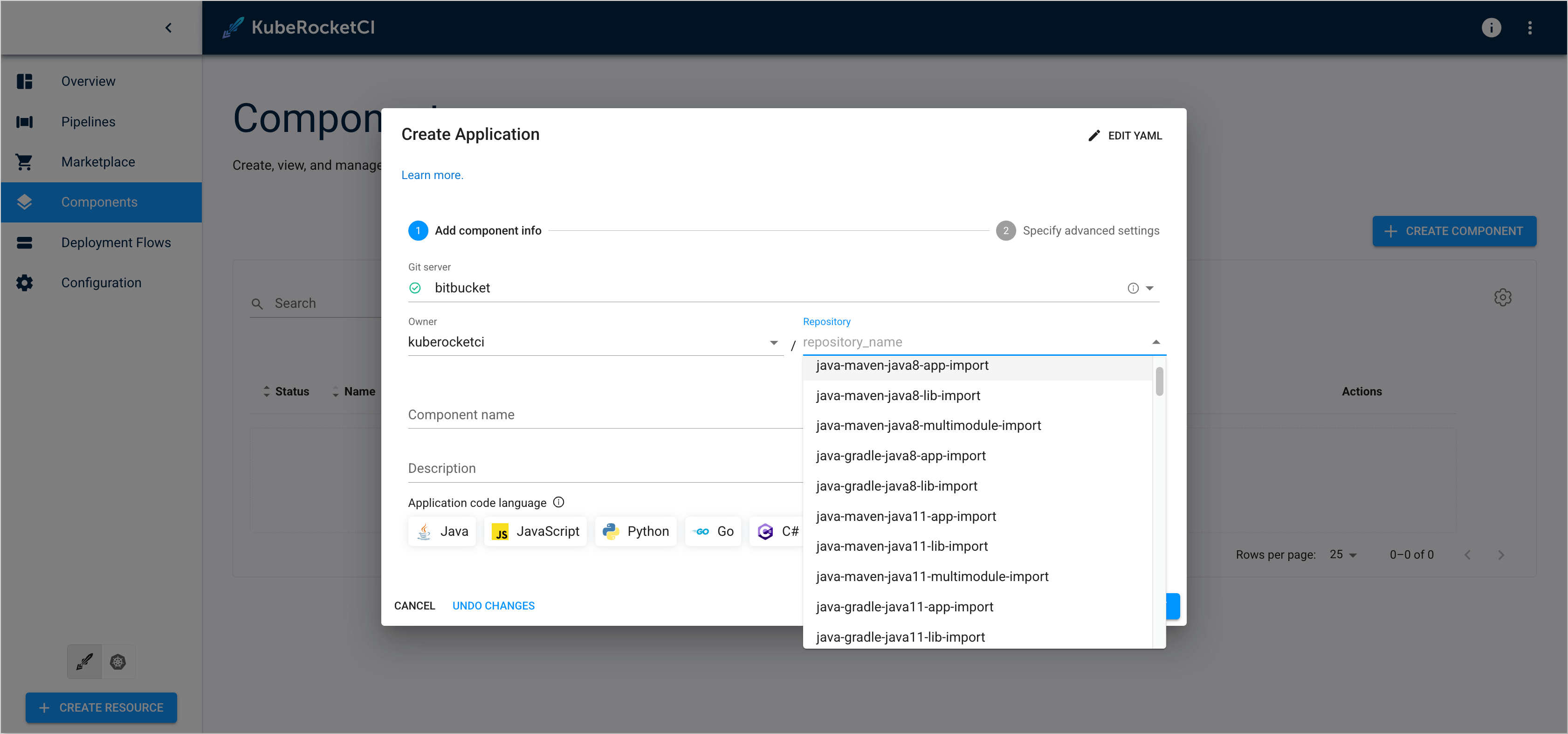
Starting from version 3.12, KubeRocketCI supports integration with the GitFusion microservice. This integration enables automatic discovery of repositories, branches, and organizations from various Git providers during the component or branch creation process in the KubeRocketCI portal. GitFusion act as a bridge between the KubeRocketCI portal and the Git provider, allowing the portal to access repository-related information without requiring direct access to the Git provider.
To enable the GitFusion integration in KubeRocketCI, follow the steps below:
-
Enable the GitFusion dependency in the
values.yamlfile foredp-installHelm chart by setting thegitfusion.enabledparameter totrue:values.yamlgitfusion:
enabled: true -
Update the KrakenD configuration to include the GitFusion API endpoints.
noteThe latest KrakenD configuration can be found in the edp-cluster-add-ons repository.
-
Clone the forked edp-cluster-add-ons repository.
-
Navigate to the
clusters/core/addons/krakenddirectory and update thevalues.yamlfile to include the GitFusion API endpoints:values.yaml
Add new GitFusion API endpoints to the
krakend.configsection:krakend:
config: |
{
"$schema": "https://www.krakend.io/schema/krakend.json",
"version": 3,
"name": "KrakenD - API Gateway",
"timeout": "6000ms",
"cache_ttl": "300s",
"output_encoding": "json",
"client_tls": {
"@comment": "Skip SSL verification when connecting to backends",
"allow_insecure_connections": true
},
"extra_config": {
"router": {
"logger_skip_paths": [
"/__health"
]
},
"auth/jwk-client": {
"@comment": "Enable a JWK shared cache amongst all endpoints of 60 minutes",
"shared_cache_duration": 3600
}
},
"endpoints": [
{
"endpoint": "/widgets/sonarqube/measures/component",
"method": "GET",
"output_encoding": "json",
"input_query_strings": [
"component",
"metricKeys"
],
"extra_config": {
"auth/validator": {
"alg": "RS256",
"cache_duration": 3600,
"cache": true,
"disable_jwk_security": false,
"jwk_url": "{{ env "JWK_URL" }}"
}
},
"backend": [
{
"url_pattern": "/api/measures/component",
"encoding": "json",
"sd": "static",
"method": "GET",
"host": [
"{{ env "SONARQUBE_URL" }}"
],
"extra_config": {
"qos/http-cache": {},
"modifier/martian": {
"header.Append": {
"scope": [
"request"
],
"name": "Authorization",
"value": "Basic {{ env "SONARQUBE_TOKEN" }}"
}
}
}
}
]
},
{
"endpoint": "/widgets/deptrack/project",
"method": "GET",
"output_encoding": "json",
"input_query_strings": [
"name"
],
"extra_config": {
"auth/validator": {
"alg": "RS256",
"cache_duration": 3600,
"cache": true,
"disable_jwk_security": false,
"jwk_url": "{{ env "JWK_URL" }}"
}
},
"backend": [
{
"url_pattern": "/api/v1/project",
"encoding": "json",
"sd": "static",
"method": "GET",
"host": [
"{{ env "DEPTRACK_URL" }}"
],
"is_collection": true,
"extra_config": {
"qos/http-cache": {},
"modifier/martian": {
"header.Append": {
"scope": [
"request"
],
"name": "X-Api-Key",
"value": "{{ env "DEPTRACK_TOKEN" }}"
}
}
}
}
]
},
{
"endpoint": "/widgets/deptrack/metrics/project/{uuid}/current",
"method": "GET",
"output_encoding": "json",
"input_query_strings": [
"name"
],
"extra_config": {
"auth/validator": {
"alg": "RS256",
"cache_duration": 3600,
"cache": true,
"disable_jwk_security": false,
"jwk_url": "{{ env "JWK_URL" }}"
}
},
"backend": [
{
"url_pattern": "/api/v1/metrics/project/{uuid}/current",
"encoding": "json",
"sd": "static",
"method": "GET",
"host": [
"{{ env "DEPTRACK_URL" }}"
],
"is_collection": false,
"extra_config": {
"qos/http-cache": {},
"modifier/martian": {
"header.Append": {
"scope": [
"request"
],
"name": "X-Api-Key",
"value": "{{ env "DEPTRACK_TOKEN" }}"
}
}
}
}
]
},
{
"endpoint": "/search/logs",
"method": "POST",
"output_encoding": "json",
"extra_config": {
"auth/validator": {
"alg": "RS256",
"cache_duration": 3600,
"cache": true,
"disable_jwk_security": false,
"jwk_url": "{{ env "JWK_URL" }}"
}
},
"backend": [
{
"url_pattern": "/logstash-edp-*/_search",
"method": "POST",
"host": [
"{{ env "OPENSEARCH_URL" }}"
],
"encoding": "json",
"extra_config": {
"qos/http-cache": {},
"modifier/martian": {
"header.Append": {
"scope": [
"request"
],
"name": "Authorization",
"value": "Basic {{ env "OPENSEARCH_CREDS" }}"
}
}
}
}
]
},
{
"endpoint": "/gitfusion/repositories",
"method": "GET",
"input_query_strings": ["*"],
"output_encoding": "json",
"extra_config": {
"auth/validator": {
"alg": "RS256",
"cache_duration": 3600,
"cache": true,
"disable_jwk_security": false,
"jwk_url": "{{ env "JWK_URL" }}"
}
},
"backend": [
{
"url_pattern": "/api/v1/repositories",
"encoding": "json",
"sd": "static",
"method": "GET",
"host": [
"{{ env "GITFUSION_URL" }}"
],
"extra_config": {
"qos/http-cache": {}
}
}
]
},
{
"endpoint": "/gitfusion/repository",
"method": "GET",
"input_query_strings": ["*"],
"output_encoding": "json",
"extra_config": {
"auth/validator": {
"alg": "RS256",
"cache_duration": 3600,
"cache": true,
"disable_jwk_security": false,
"jwk_url": "{{ env "JWK_URL" }}"
}
},
"backend": [
{
"url_pattern": "/api/v1/repository",
"encoding": "json",
"sd": "static",
"method": "GET",
"host": [
"{{ env "GITFUSION_URL" }}"
],
"extra_config": {
"qos/http-cache": {}
}
}
]
},
{
"endpoint": "/gitfusion/organizations",
"method": "GET",
"input_query_strings": ["*"],
"output_encoding": "json",
"extra_config": {
"auth/validator": {
"alg": "RS256",
"cache_duration": 3600,
"cache": true,
"disable_jwk_security": false,
"jwk_url": "{{ env "JWK_URL" }}"
}
},
"backend": [
{
"url_pattern": "/api/v1/user/organizations",
"encoding": "json",
"sd": "static",
"method": "GET",
"host": [
"{{ env "GITFUSION_URL" }}"
],
"extra_config": {
"qos/http-cache": {}
}
}
]
},
{
"endpoint": "/gitfusion/branches",
"method": "GET",
"input_query_strings": ["*"],
"output_encoding": "json",
"extra_config": {
"auth/validator": {
"alg": "RS256",
"cache_duration": 3600,
"cache": true,
"disable_jwk_security": false,
"jwk_url": "{{ env "JWK_URL" }}"
}
},
"backend": [
{
"url_pattern": "/api/v1/branches",
"encoding": "json",
"sd": "static",
"method": "GET",
"host": [
"{{ env "GITFUSION_URL" }}"
],
"extra_config": {
"qos/http-cache": {}
}
}
]
},
{
"endpoint": "/gitfusion/invalidate",
"method": "POST",
"input_query_strings": ["*"],
"output_encoding": "json",
"extra_config": {
"auth/validator": {
"alg": "RS256",
"cache_duration": 3600,
"cache": true,
"disable_jwk_security": false,
"jwk_url": "{{ env "JWK_URL" }}"
}
},
"backend": [
{
"url_pattern": "/api/v1/cache/invalidate",
"encoding": "json",
"sd": "static",
"method": "DELETE",
"host": [
"{{ env "GITFUSION_URL" }}"
],
"extra_config": {
"qos/http-cache": {}
}
}
]
}
]
} -
Update the KrakenD secret with the GitFusion URL variable.
noteThe
GITFUSION_URLvariable should point to the GitFusion service URL, e.g.,http://gitfusion.<krci-namespace>:8080.Update the
krakendsecret to include theGITFUSION_URLvariable:KrakenD secretkind: Secret
apiVersion: v1
metadata:
name: krakend
namespace: krakend
data:
...
GITFUSION_URL: http://gitfusion.<krci-namespace>:8080
type: OpaqueIn case of using the External Secrets Operator with AWS Parameter Store, update the Parameter Store object to include the
GITFUSION_URLvariable:AWS Parameter Store{
"SONARQUBE_URL": "http://sonar.sonar:9000",
"SONARQUBE_TOKEN": "<sonarqube-token",
"DEPTRACK_URL": "http://dependency-track-api-server.dependency-track:8080",
"DEPTRACK_TOKEN": "<dependency-track-token>",
"JWK_URL": "https://keycloak.example.com/realms/<realmName>/protocol/openid-connect/certs",
"OPENSEARCH_URL": "https://opensearch-cluster-master.logging:9200",
"OPENSEARCH_CREDS": "opensearch-base64-encoded-credentials",
"GITFUSION_URL": "http://gitfusion.<krci-namespace>:8080"
} -
Commit and push the changes to the
edp-cluster-add-onsrepository. After the changes are pushed, navigate to the Argo CD and sync the KrakenD application to apply the updated configuration.
After upgrading KubeRocketCI to version 3.12, the GitFusion microservice will be automatically used for repository discovery in the KubeRocketCI portal.
Example of repository discovery in the KubeRocketCI portal during the component onboarding process:
-
-
-
To upgrade KubeRocketCI to the v3.12, run the following commands:
noteTo verify the installation, it is possible to test the deployment before applying it to the cluster with the
--dry-runkey:helm upgrade krci epamedp/edp-install -n krci --values values.yaml --version=3.12.0 --dry-runhelm repo update epamedp
helm upgrade krci epamedp/edp-install -n krci --values values.yaml --version=3.12.0